

BobloScript.com

A Universal Time script: Vellure Hub

Published by bebraPublished Apr 12
Open in Roblox
188Views
132Copies
29 days agoUpdated

Description

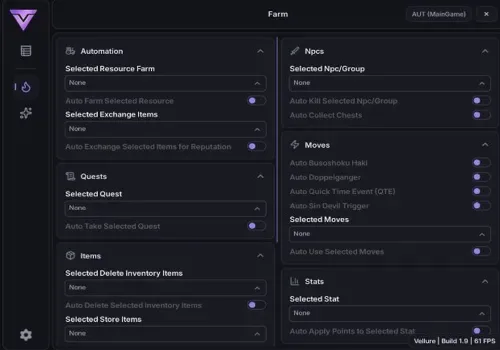
Many actions in this hub need you to pick a target before the script runs it. For example, setting Selected NPC/Group tells the script who to fight, while Auto Kill Selected NPC/Group starts the fighting. If you skip the first step, the second one won't have a target.

Start with selecting a single resource

Open the hub, pick a resource in the Selected Resource Farm dropdown, and turn on Auto Farm Selected Resource. Your character will collect that item. Watch the pathing: if the script struggles to reach nodes, keep this one task running until it smooths out before adding others.

Add automated helpers on top

  • Turning on Auto Exchange Selected Items for Reputation consumes the resources you farm. If you need them for crafting later, turn this off until you have extras.

  • Running Auto Kill Selected NPC/Group alongside farming splits your character's time. Pick one main goal if speed matters, because doing both at once slows down each one.

  • If you enable Auto Delete Selected Inventory Items, double-check which items you marked for deletion. The script clears them right away without a confirmation popup.

Reset your character mid-fight

If you get stuck or need to drop your current ability, use Reset Character (Usable in Combat) instead of the normal respawn. It works while you are in combat and keeps you in the server. If you only want to clear the stand without dying, use Get Standless separately.

Functions

37 functions
  • Selected Resource FarmLets you choose a specific resource to target for farming.
  • Auto Farm Selected ResourceAutomatically farms the chosen resource for efficient grinding.
  • Selected Exchange ItemsAllows you to pick which items to exchange.
  • Auto Exchange Selected Items for ReputationConverts selected items into reputation automatically.
  • Selected QuestChoose a specific quest to focus on.
  • Auto Take Selected QuestAutomatically accepts the selected quest to streamline progression.
  • Selected Delete Inventory ItemsSelect unwanted items for removal.
  • Auto Delete Selected Inventory ItemsAutomatically clears chosen items from your inventory.
  • Selected Store ItemsChoose items to store safely.
  • Auto Store ItemsAutomatically stores selected items.
  • Auto Sell ItemsSells items automatically for consistent income.
  • Auto Ascend Current AbilityAutomatically upgrades and ascends your active ability.
  • Auto Claim Playtime/Daily RewardsCollects all available rewards without manual input.
  • Selected NPC/GroupChoose a specific NPC or enemy group to target.
  • Auto Kill Selected NPC/GroupAutomatically defeats selected enemies.
  • Auto Collect ChestsPicks up all nearby chests for extra loot.
  • Auto Busoshoku HakiActivates Haki automatically during combat.
  • Auto DoppelgangerUses the Doppelganger ability when available.
  • Auto Quick Time Event (QTE)Completes QTEs instantly.
  • Selected MovesChoose specific abilities or attacks.
  • Auto Use Selected MovesAutomatically uses selected moves in combat.
  • Selected StatChoose which stat to upgrade.
  • Auto Apply Points to Selected StatDistributes stat points automatically.
  • Selected Skin Rarities for RecyclingChoose which skin tiers to recycle.
  • Auto (Recycle & Forge) Unusual SkinsAutomatically processes skins for upgrades.
  • Auto Open Skin CratesOpens all available skin crates automatically.
  • Speed / Walk SpeedAdjusts your movement speed for faster travel.
  • Get StandlessRemoves your current ability/stand when needed.
  • Reset Character (Usable in Combat)Instantly resets your character even during fights.
  • Update KeycardRefreshes access permissions automatically.
  • Rejoin ServerQuickly reconnects to the current server.
  • Server HopSwitches servers to find better conditions or resources.
  • Hide NameConceals your in-game name for privacy.
  • Map TeleportsAccess teleportation across different locations.
  • NPC TeleportsQuickly travel to specific NPCs.
  • Teleport To Selected MapInstantly move to a chosen area.
  • Teleport To Selected NPCInstantly reach selected NPCs for quests or farming.

Script Code

Raw Code

This script loads code from an external source. Review the URL and understand what it does before running it in Roblox.

https://raw.githubusercontent.com/NyxaSylph/Vellure/refs/heads/main/Loader
loadstring(game:HttpGet("https://raw.githubusercontent.com/NyxaSylph/Vellure/refs/heads/main/Loader"))()
Latest changeDescription rewrite29d ago

Comments

Loading comments…