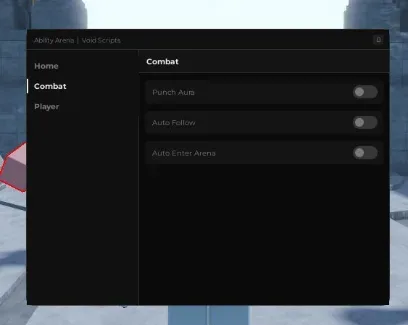
 Ability Arena 💥NO KEY
Ability Arena script - (Punch Aura)
Published by VoidScriptsPublished Jul 17
Community:
 Discord
566Views
305Copies
NeverUpdated
This Ability Arena script by Void Scripts combines automatic attacks, target following, arena entry, player tracking, and movement tools.
Ability Arena is a PvP fighting game where players battle in an open arena and unlock different ability movesets. The game currently lists 24 usable movesets, so regular combat and earning progression remain central to the experience.
The script is useful when you want to spend less time searching for opponents, returning after a death, or pressing the basic attack repeatedly.
Punch Aura automatically attempts to punch another player when they enter the supported range.
This helps during close-range fights where targets constantly move around your character. Instead of manually clicking for every punch, the function keeps attacking while an opponent remains close enough.
Punch Aura can be useful when:
several players are fighting in the same area;
you want to collect hits with fewer repeated inputs;
an opponent keeps circling around your character;
Auto Follow has already moved you close to a target.
The function does not control your abilities or build a complete combo. It only handles the punch action supported by the script.
Auto Follow moves your character toward another player.
Punch Aura only helps while someone is within attack range. Auto Follow supports it by closing the distance when the target moves away.
Together, the two functions create a simple loop:
Auto Follow finds and approaches a player.
Punch Aura attacks when the target is close.
Auto Follow continues moving if the player escapes the current range.
The process repeats while both options remain enabled.
Automatic movement may struggle around walls, platforms, or crowded parts of the arena. It may also follow a different player than the one you intended to fight.
Auto Enter Arena automatically attempts to return your character to the combat area after a death or respawn.
This removes the need to press the arena-entry button every time your character is defeated. It is useful during repeated farming sessions because the script can resume the combat loop with less manual input.
The function does not prevent deaths or protect your character. It only helps you return after the normal respawn process.
Player ESP highlights other players around the map.
It can help you locate opponents through walls, map objects, or crowded effects. This is useful when you respawn, enter the arena, or lose track of the player Auto Follow is chasing.
Player ESP helps answer one question: where are the other players?
It does not tell you:
which ability moveset they use;
whether their abilities are ready;
how much experience they have;
whether they are about to attack;
which opponent is safest to approach.
Use ESP for positioning information, not as proof that a player is an easy target.
Speed Changer adjusts how quickly your character moves.
A moderate speed increase can make it easier to reach another fight, stay close to a moving opponent, or return to the active part of the arena.
Very high values can make movement harder to control. Your character may overshoot targets, collide with map objects, or move in a way that causes Auto Follow to become unstable.
Increase the value gradually instead of immediately selecting the maximum speed.
Infinite Jump lets your character jump repeatedly without waiting to touch the ground.
This can help you:
move over small obstacles;
change your position during a crowded fight;
reach elevated parts of the map;
avoid staying directly beside several attackers.
Infinite Jump does not make your character invincible. Other players may still hit you in the air, and some abilities can cover a wide vertical area.
Use Punch Aura, Auto Follow, and Auto Enter Arena together when you want the script to handle most of the repeated combat cycle.
Use Player ESP, Speed Changer, and Infinite Jump separately when you still want to choose opponents and control fights yourself.
Starting with the movement and visual tools gives you more control. Turning on every automation option creates a faster farming loop, but it also makes the character’s actions less predictable.
Open Ability Arena and wait for your character to load.
Copy the Void Scripts code from the script block.
Open a compatible Roblox executor.
Paste the code into the executor and press Execute.
Enable Player ESP first to confirm that the script detects other players.
Turn on Punch Aura and test it near one opponent.
Enable Auto Follow if you want the script to approach targets automatically.
Activate Auto Enter Arena if you want the farming loop to resume after respawning.
Adjust Speed Changer slowly and enable Infinite Jump only when needed.
Execute the script only once per server. Running several copies may create duplicate attack, movement, ESP, or arena-entry loops.
The script may stop working if Ability Arena changes its punch system, character structure, arena-entry interface, or player movement logic.
Possible signs of an outdated version include:
Punch Aura does not attack nearby players;
Auto Follow moves toward an old or defeated target;
Auto Enter Arena activates before the character finishes respawning;
ESP remains attached to players who have left;
Speed Changer resets immediately;
Infinite Jump stops after a character reset.
Third-party scripts and Roblox executors may violate Roblox rules and can lead to account penalties. Never enter your Roblox password, account cookies, or personal information into a script or executor.
This script loads code from an external source. Review the URL and understand what it does before running it in Roblox.
1loadstring(game:HttpGet("https://pastefy.app/q3DwR4qd/raw"))()by Banjomeni · 1 script · 566 views

Browse
Script Types
Tools
Community
Comments
Loading comments…