
BobloScript.com

BobloScript Review

Working during our test

Tested by bebra · BobloScript editorial team · Nov 25, 2026

Test setup: Windows PC, Android · Potassium (Windows), Delta (Android)

Test coverage

All 46 listed features checked

No failures found.

Test notes

We tested the farm on Update 21.5. Runs started from the lobby, and the farm reloaded and continued after teleports. In one Summer Hunt run, the planner predicted a loss at wave 8 and the run ended at wave 8.

Known limitations

Rewards depend on the mode played and how far the team gets.

This reflects one test at a specific point in time, not an ongoing guarantee. How we test scripts

Script Code

Raw code

This script loads code from an external source. Review the URL and understand what it does before running it in Roblox.

https://raw.githubusercontent.com/bobloscript/robscript/main/AnimeAdventures

loadstring(game:HttpGet("https://raw.githubusercontent.com/bobloscript/robscript/main/AnimeAdventures"))()
Latest changethumbnail added1h ago

Description

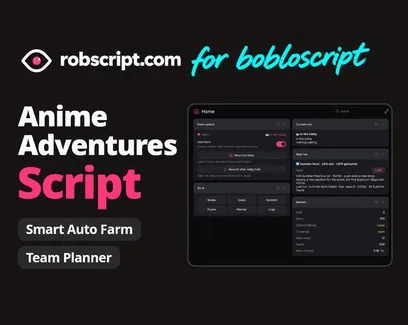
A full farming loop starts in the lobby. The planner ranks your available runs by estimated rewards and chances of winning, then evaluates teams from your roster. After a match, the farm can pick another stage and resume after the teleport.

Set a goal for the farm

Leave stage selection on Smart to let enabled modes compete for the next run. Pick Only this mode when you want to stay in one mode. Check Next Run in Home to see the pick and its estimated payoff.

To work toward an evolution, select a target in Units → Goals. The farm can prioritize its materials, buy a required item from the raid shop, and bring the target unit along to train takedowns when the rest of the team can handle the run.

Read the plan before a match

In Battle → Planner, check the expected result and the suggested lineup. Equip planned team lets the farm use that lineup for the run and restore your team afterward. During the match, the battle controls handle placement, upgrades and ability timing. Rewards vary with the mode, and the prediction depends on the units you own.

Control what gets spent

  • Upgrades. Use Preview Upgrades Only to see the planned spending before using resources.

  • Summons. Set the currency reserves first. Banner Snipe stops when the target drops or the reserve is reached.

  • Fusion. Review which units will be used as fodder before enabling a limit break or XP fusion. Fusion consumes those units.

  • Smart Auto Farm & Mode Selection
  • Chain Runs
  • Auto Reload After Teleport
  • Return to Lobby & Resume After Lobby Hold
  • Auto Story with Smart Map Selection
  • Auto Legend Stages
  • Auto Infinite & Leave After Daily Gems
  • Auto Portals with Win Estimate
  • Auto Raids
  • Auto Artifact Stages
  • Auto Dungeon & Start New Dungeon Runs
  • Auto Challenges with Filters & Minimum Win Chance
  • Repeat Until Daily Challenge Win
  • Auto Summer Hunt
  • Summer Hunt Card & Charm Selection
  • Manage Event Skins
  • Open Sunny Stars with Pearl Reserve
  • Party Matchmaking for Selected Modes
  • Mode Priorities & Rest After Losses
  • Session Stats & Next Run Preview
  • Auto Start
  • Auto Place & Search For Best Spots
  • Auto Upgrade During Battles
  • Auto Abilities & Ability Hold
  • Smart Targeting
  • Farm Units & Defense Thresholds
  • Battle Simulator & Wave Prediction
  • Mode Ranking by Estimated Rewards & Win Chance
  • Plan Best Teams
  • Equip Planned Team & Restore My Team
  • Target Evolution & Farm Toward Goals
  • Train Takedowns & Return When Trained
  • Raid Shop For Goals
  • Smart Evolve
  • Automatic Core Unit Upgrades
  • Preview Upgrades Only
  • Feed & Buy XP Food with Gold Reserve
  • Smart Relics
  • Auto Limit Break Core
  • Limit Break with Fodder Selection
  • XP Fusion with Maximum Fodder Rarity
  • Banner Snipe with Currency Reserves
  • Auto Summon with Currency Reserve & Summons Per Visit
  • Gem Banner When It Helps
  • Skip Summon Animations
  • Study a Unit in Live Matches

Developer tested with

Windows

  • Athena
  • Isaeva
  • Lynx
  • Madium
  • Potassium
  • Real
  • Sirhurt
  • Synapse Z
  • Velocity
  • Volt
  • Wave

Android

  • Delta
  • Vega X

iOS

  • Delta

macOS

  • Macsploit
  • Opiumware

Doesn't work

Windows

  • Solara
  • Xeno

Screenshots

10 images

Comments

Loading comments…