
 Discord
32Views
9Copies
Jul 13Updated
Anime Overseer is built around team building, wave defense, unit upgrades, and repeat runs across maps, challenges, and raids. Ouroboros Hub connects those systems into one automated route: start a match, clear its waves, choose what happens after the result screen, then move into the next run without rebuilding the setup each time.
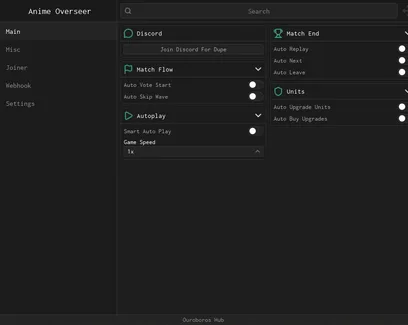
The match controls are useful when you already have a team that can clear a stage and want to repeat it for rewards. Auto Vote Start begins the run, while Auto Skip Wave removes the wait between completed waves.
Smart Auto Play handles the repeated actions during a match. Auto Upgrade Units spends available resources on deployed units, helping them keep up as enemy health and wave pressure increase. The separate Auto Buy Upgrades option can purchase available upgrades without making you check the menu manually.
When the stage ends, you decide what the hub should do next:
Auto Replay repeats the same map and act.
Auto Next moves forward after a successful clear.
Auto Leave returns your character when the run is finished.
Game Speed changes the pace used during automated matches.
Friends Only creates a more controlled session with invited players.
Public Matchmaking searches for other players when you do not want to run alone.
Replay is the better choice when you need the same reward several times. Auto Next makes more sense when your team is strong enough to continue progressing through new acts.
The map section lets you set the route before automation starts. Select the mode, map, act, and difficulty, then enable Auto Run Map.
This keeps the script focused on the content you actually need. There is no reason to repeat an easy story stage when your current goal is a raid material, challenge reward, or a harder difficulty that pays more.
Challenge Rotation lets the hub follow the selected challenge cycle, while Auto Run Challenge starts the available challenge automatically. Challenges can matter when you need resources that are harder to collect from normal story stages.
For raids, choose the raid and its act before enabling Auto Run Raid. This is useful for repeated clears when a unit evolution or crafted item needs raid-related materials.
A team may handle the opening waves but still fail later because its damage, speed, or support units were not upgraded at the right time. Auto Upgrade Units keeps spending match currency as the run develops instead of leaving units at their starting level.
That is especially useful for longer stages. Early enemies usually need less investment, while bosses and late waves can punish a team that saved too much currency or upgraded the wrong unit too late.
The automation does not replace a good team. You still need a useful mix of damage, fast attackers, support, and units that can survive pressure. It simply removes the repeated upgrade clicks once that team is ready.
The summon settings give you more control than leaving Auto Summon running without a limit.
Choose a banner, set the number of pulls, and then select a stopping rule:
Stop At Unit ends summoning after the chosen unit appears.
Stop At Rarity stops when the required rarity is pulled.
Per Pull Amount controls how many summons are made in each cycle.
Auto Summon continues pulling until one of your selected conditions is reached.
These limits can protect your Gems. For example, you can target one missing unit without spending the rest of your balance after it has already been obtained.
Select an item, enter the quantity, choose the crafting mode, and enable Auto Craft. This works well when an evolution needs several copies of the same material and crafting them one by one would interrupt your farming route.
The quantity setting is important. It prevents the hub from using more materials than you planned, especially when the same resources are needed by several units.
Ouroboros Hub also includes tools for specialization, classes, grades, and traits. Start by selecting a unit, then refresh the unit list if you recently summoned or changed your inventory.
The stopping options tell the automation when it has reached an acceptable result:
Stop At Grade keeps class rerolls from continuing after the selected grade appears.
Stop At Trait targets a specific trait.
Stop At Trait Rarity accepts a chosen rarity level instead of one exact trait.
Auto Specialization applies the selected specialization process automatically.
Auto Class Reroll repeats class rolls until the grade condition is met.
Reroll resources are usually more valuable than basic Gold, so setting a stop condition matters. Running a reroll without one can waste materials on a unit that was already good enough.
Several rewards in Anime Overseer sit in separate menus. The hub can claim daily login rewards, quests, playtime rewards, achievements, level milestones, Battle Pass rewards, and Unit Index rewards.
Redeem Codes handles available codes as well. Claiming these rewards first can give you extra Gems, Gold, or upgrade resources before the script begins summoning and running maps.
This makes the full route straightforward: collect what is waiting, prepare the unit you want to improve, choose a stage, and let the hub repeat the content until your target is reached.
This script loads code from an external source. Review the URL and understand what it does before running it in Roblox.
https://raw.githubusercontent.com/joustingmatch/Ouroboros/main/loader.lua
1loadstring(game:HttpGet("https://raw.githubusercontent.com/joustingmatch/Ouroboros/main/loader.lua"))()by v2 studio - anime overseer · 1 script · 32 views
Browse
Script Types
Tools
Community

Comments
Loading comments…