

 Discord
93Views
54Copies
Jul 13Updated
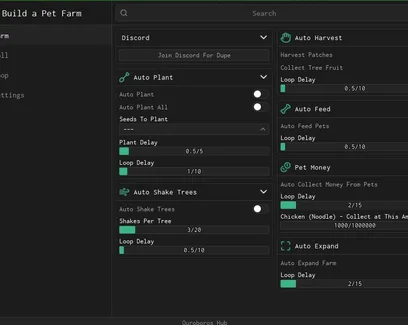
Build a Pet Farm starts with rolling seeds, planting them, harvesting fruit, and feeding pets so they can generate money. Ouroboros Hub automates that cycle, including farm expansion, upgrades, shopping, and rebirths.
Choose the seeds you want to use, then enable Auto Plant for selected seeds or Auto Plant All to fill every available patch. The planting delay controls how quickly new seeds are placed.
Once the farm is active, the script can:
shake each tree a chosen number of times;
harvest crop patches and collect tree fruit;
feed pets automatically;
collect the money produced by pets.
Collect Chicken Money At Amount lets you wait until the chicken income reaches a useful value instead of collecting every small payment immediately.
Auto Roll searches for new seed results, while Auto Purchase Rolled buys them based on the rarities you choose to keep. This helps avoid spending money on rolls that do not fit your current farm.
The hub can also purchase selected upgrades, expand the plot, and handle rebirths. Use Upgrades To Buy to focus spending on the improvements you need instead of purchasing everything.
Separate buyers are available for gear and cosmetics. Choose the exact items first, then enable the matching automation. Each system has its own loop delay, so shop checks do not need to run constantly.
This setup is most useful when you want the farm to continue planting, feeding pets, and collecting income while gradually unlocking more space and better equipment. The game also supports offline farm growth and pet earnings, so returning later can provide additional income outside the automated session.
This script loads code from an external source. Review the URL and understand what it does before running it in Roblox.
https://raw.githubusercontent.com/joustingmatch/Ouroboros/main/loader.lua

Comments
Loading comments…