 Catch and Cook!NO KEY
Catch and Cook script: Auto Fishing & 70+ Functions
Published by bebraPublished May 12

Community:
 Discord
42Views
9Copies
23 days agoUpdated
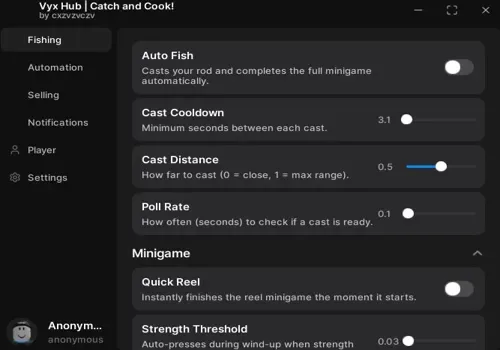
Catch and Cook!NO KEYDuring our check, Auto Fish looked like it was doing nothing because the fishing minigame did not appear to play through normally. After we disabled the option and checked the inventory, a new fish was there. Judge the result by your inventory, not only by the animation on screen.
Enable Auto Fish by itself first, let it run for several attempts, then compare your inventory.
Use Set Farm Spot before enabling Auto Return or the spawn teleport, since both rely on the saved position.
Configure the keep and protection filters before turning on Auto Sell so catches you still need are excluded from selling.
The test account was still at beginner progression, so we could not reach every activity needed to check the full menu. Controls tied to later progression are listed from the author's updated function information, but they were not confirmed in our session.
The fishing result was confirmed through the inventory. Do not treat that single check as proof that every control currently works.
This script loads code from an external source. Review the URL and understand what it does before running it in Roblox.
https://raw.githubusercontent.com/cxzvzvczv/Vyx-Hub/refs/heads/main/Catch%20and%20Cook.lua

Comments
Loading comments…