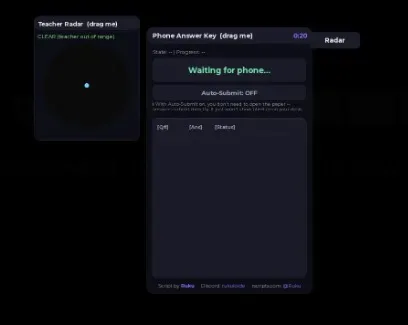
The script copies answers revealed by your Phone into a larger panel and can submit them as soon as they load.
Reveal the answers first
Run the script after the match starts and open Answer Key from the top-right corner. Use the Phone normally: press Q to take a photo and E to load it. The panel only shows answers revealed by the game's Phone and automatically uses the highest Phone tier you own.
Choose when to submit
Leave Auto-Submit off if you want to review the revealed answers first. Turn it on when you want each answer sent as soon as it loads. The status beside each question shows whether it is waiting, sending, accepted, or failed.
Check the teacher before using the Phone
Open Radar before taking another photo. It maps the teacher, nearby desks, and other students from above, while the danger indicator combines distance with the teacher's facing direction.
The teacher-facing cone is only a visual approximation. The real detection runs on the server, so treat the radar as a guide rather than a guarantee.
Functions
8 functions
📋 Answer Key panelmirrors your Phone's revealed answers in large readable text instead of the in-world screen
⚡ Auto-Submitone click submits every revealed answer automatically, with live per-question status (pending → sending → ✓ OK / ✗ failed)
📊 Submission logclean table view of every question, your answer, and its submit status
⏱ Test timerlive countdown mirrored from the actual assessment clock
🗺 Teacher Radartop-down live map showing the teacher's position, facing direction/cone, nearby desks and other students so you can time your photo/load without walking into the teacher's sightline
🚦 Danger/Caution/Clear indicatorfactors both distance and whether the teacher is actually facing you
🎨 Clean dark UI
🔄 Auto-resets between rounds/respawns
Script Code
This script loads code from an external source. Review the URL and understand what it does before running it in Roblox.
Comments
Loading comments…