Chicken Farm follows a simple loop: buy chickens, collect their eggs, deposit the eggs for cash, then merge chickens and improve the farm. Rarer chickens produce eggs faster, so most progress comes from reinvesting income into better birds and upgrades.
Ouroboros Hub automates this routine without adding unnecessary movement or combat tools.
Collect and deposit eggs automatically
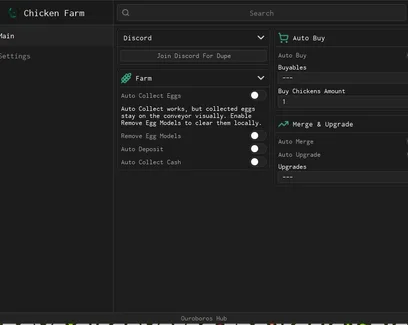
Auto Collect Eggs gathers the eggs produced around the farm. Auto Deposit then transfers them into the deposit system so they can be converted into cash.
Remove Egg Models clears the physical egg objects after collection. This can reduce visual clutter during longer farming sessions, especially when many chickens are producing at once.
Auto Collect Cash completes the income loop by claiming the money generated from deposited eggs.
Buy and merge stronger chickens
Choose the available purchases under Buyables, set the number of chickens to buy, and enable Auto Buy. The amount setting is useful when you want to purchase several chickens per cycle rather than repeating the shop action manually.
Auto Merge combines matching chickens to unlock higher tiers. Since stronger chickens improve egg production, merging helps the farm earn faster without filling the nest with weaker birds.
Purchase selected farm upgrades
Auto Upgrade buys the improvements chosen under Upgrades To Buy. Use the selection list to focus spending on the part of the farm that is currently slowing progress, such as egg production, depositing, or cash generation.

 Discord

Comments
Loading comments…