
 Discord
226Views
111Copies
Jul 13Updated
Make a Drill Farm is about rolling stronger drills, placing them on your plot, collecting the ores they produce, and expanding the farm with more tiles. Better drills increase production, while new space lets you run a larger setup. The game also continues mining while you are offline.
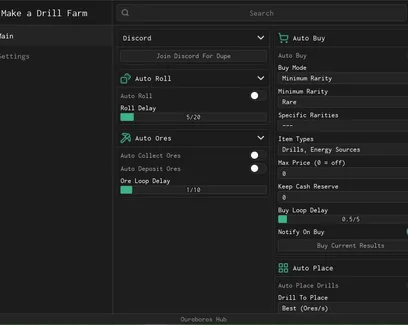
Ouroboros Hub automates this progression while giving you limits for rarity, price, placement, and spending.
Auto Roll keeps generating new results at the delay you choose. Auto Buy can then purchase items based on your filters instead of taking everything that appears.
You can control purchases by:
minimum or selected rarities;
item type;
maximum price;
protected cash reserve.
Buy Current Results is useful when the current roll already contains something you want, while Notify On Buy confirms when the script makes a purchase. These filters help avoid wasting money on weak or overpriced equipment.
Auto Collect Ores gathers production from your placed drills, and Auto Deposit Ores moves the collected resources into the game’s deposit system. The Ore Loop Delay controls how often both actions repeat.
Select a drill and allowed rarities before enabling Auto Place Drills. This lets you fill open spaces without manually placing each machine.
Auto Buy Tiles unlocks more room for drills as your farm grows. Set Keep Cash Reserve for Tiles first so expansion does not use money saved for better equipment.
The script can also replace an existing drill when a stronger one becomes available. Minimum Ores Per Second Gain decides how much better the new drill must be before the replacement happens. A higher value prevents small upgrades from constantly rearranging the farm.
Notify On Replace shows when a drill has been changed, while the replacement delay controls how often the script checks your current setup.
This script loads code from an external source. Review the URL and understand what it does before running it in Roblox.
https://raw.githubusercontent.com/joustingmatch/Ouroboros/main/loader.lua

Comments
Loading comments…