Mine a Mountain Script (DonnieAzoff) - Crystal ESP and Dual-Loop AutoFarm
Keyless automation for Mine a Mountain. This script features dual automation loops for physical ore mining and currency grinding, advanced value-filtered ESP, and comprehensive inventory management. No key system required.
What This Script Does
Targeted Automation
Boulder Auto Farm: Automatically mines boulders with live status tracking. Crucially, it allows specific ore targeting (Mossite, Voltite, Gildrite, and more) so you can focus on high-value endgame materials.
Money Auto Farm: Automates the currency grinding loop. It includes an auto-sell trigger at 50% backpack capacity, preventing inventory lock without waiting for a full bag.
Advanced ESP and Filtering
Crystal ESP: Highlights crystals with a minimum value filter and live tracking statistics (tracked vs. shown counts), allowing you to ignore low-tier drops.
Boulder ESP: Highlights boulders with adjustable size and specific ore target selection.
Player ESP: Highlights other players with adjustable sizing.
Teleportation and Navigation
Smart Crystal Teleport: Instantly teleport to the top value, top luck, or top weight crystal.
Aim Teleport: Teleport to any location your camera is pointed at, with a configurable keybind.
Home Base Teleport: Quick return to your designated safe zone or base.
Movement and Utility
Movement Suite: Flight (with speed adjustment), Noclip, Infinite Jump, and Movement Speed boost.
Inventory Management: Auto pickup, Instant prompt interaction, Auto rune pickup, Sell all items, and a live backpack weight display.
Why Choose This Script
Dual-Loop Farming Logic: Unlike basic scripts that only automate one task, this separates physical boulder mining from money grinding, allowing you to optimize both progression paths simultaneously.
50% Capacity Auto-Sell: This specific threshold is a high-utility feature. It keeps your farming loop continuous by selling items halfway through, eliminating the downtime of waiting for a 100% full inventory.
Value-Filtered ESP: The minimum value filter for crystals prevents visual clutter and ensures you only focus on high-yield targets.
How to Use
Launch Mine a Mountain on Roblox.
Open your PC or mobile executor.
Inject the executor and paste the script.
Execute the script and open the GUI.
Configure your Boulder Auto Farm to target specific ores (e.g., Mossite or Voltite).
Enable Money Auto Farm and verify the 50% auto-sell threshold is active.
Adjust the Crystal ESP minimum value filter to hide low-tier drops.
FAQ
How does the 50% auto-sell capacity feature work? Instead of waiting until your backpack is 100% full to sell items (which pauses your farming loop), the script automatically triggers the sell function when your weight reaches 50%. This keeps your inventory flowing and maximizes continuous grinding time.
Can I target specific ores with the Boulder Auto Farm? Yes. The Boulder ESP and Auto Farm include target selection for specific ores, including Mossite, Voltite, and Gildrite. This allows you to automate the collection of specific high-value materials rather than just mining random rocks.
Is there a key system or Discord verification required? No. This script is completely keyless. You can execute it directly without interacting with any link-shorteners, Discord servers, or verification pages.
What is the difference between the Crystal ESP and Boulder ESP? Crystal ESP is designed for the collectible crystals scattered around the map and includes a minimum value filter to hide low-tier drops. Boulder ESP is designed for the physical rocks you mine and includes specific ore targeting (like Voltite or Gildrite) to automate your mining route.
Functions
30 functions
Crystal ESP toggle
Crystal size adjustment
Minimum value filter for crystals
Live tracking statistics showing tracked and shown counts
Player ESP toggle
Player size adjustment
Boulder ESP toggle
Boulder size adjustment
Boulder target selection for various ores including Mossite and Voltite and Gildrite and more

 Showcase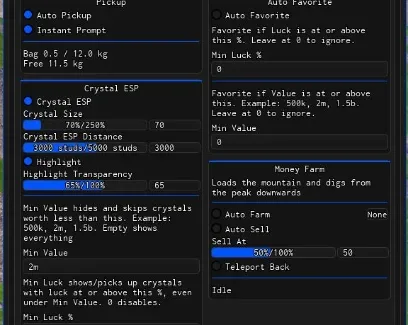






Comments
Loading comments…