 Missiles vs CitiesNO KEY
Missiles vs Cities script - (Auto Collect money, Auto Upgrade plots)

Community:
 Discord
146Views
78Copies
Jul 13Updated
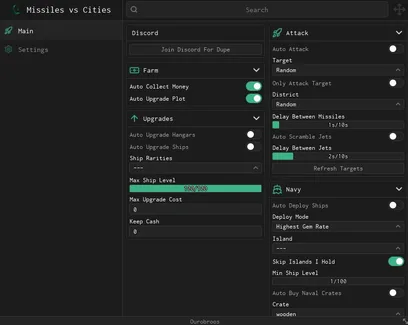
Missiles vs CitiesNO KEYMissiles vs Cities combines two kinds of progress: building up your own city and attacking rival buildings for cash and rewards. Ouroboros Hub automates both sides of that loop, from collecting income and buying plot upgrades to launching missiles, deploying ships, and sending jets into battle.
Auto Collect Money gathers the cash produced around your plot, so income does not sit unclaimed while you are choosing targets or managing the navy.
The upgrade tools can then reinvest that money into different parts of your base:
Auto Upgrade Plot buys available improvements across the main city.
Auto Upgrade Hangars develops the structures used by your aircraft.
Auto Upgrade Ships improves eligible ships in your fleet.
The spending limits are useful here. Max Upgrade Cost prevents the script from buying upgrades above the amount you are willing to pay, while Keep Cash leaves part of your balance untouched. This lets the base continue growing without using money that you planned to save for missiles, ships, or crates.
Auto Upgrade Plot works best when the reserve is set first. Otherwise, the script may purchase every affordable button and leave too little cash for the attack systems you wanted to run next.
The ship filters stop Auto Upgrade Ships from treating every vessel in the same way.
Ship Rarities limits upgrades to the rarities you select. Max Ship Level gives the automation an endpoint, so it does not keep spending on a ship after reaching your chosen level. You can also combine these settings with Max Upgrade Cost to avoid expensive late-level upgrades.
A practical setup is to upgrade stronger rarities first and leave weak ships at a lower level. That keeps more cash available for the fleet you are actually using instead of spreading resources across every ship you own.
Auto Attack repeatedly launches missiles using the target settings in the hub. Select a player or city with Target Selection, then choose an available area through District Selection.
Enable Only Attack Target when you do not want the script switching to another opponent. This is useful when you are trying to finish one damaged city or continue pressuring the same player instead of dividing missiles between several targets.
Delay Between Missiles controls the pace of the attack loop. A small delay sends attacks more often, while a longer one gives the game time to register damage, refresh the target, and prepare the next launch.
Use Refresh Targets after players join, leave, or rebuild. It updates the selection list so the hub does not keep trying to attack a target that is no longer available.
Auto Scramble Jets sends available aircraft without making you return to the hangar each time. This gives your upgraded hangars a purpose while missiles continue attacking from the ground.
The separate Delay Between Jets setting lets you control how often the hub attempts another launch. Adjust it when jets are still active or when the hangar needs more time before another aircraft can be sent.
Missiles and jets can run together, but they do not need identical delays. Keeping separate timings can make the attack loop more stable than forcing both systems to trigger at once.
The naval section focuses on where ships should be placed and which ships are allowed into the deployment loop.
Choose an island with Island Selection, then select the behavior you need through Deploy Mode. Auto Deploy Ships will continue using those settings as eligible ships become available.
Two filters help prevent poor deployments:
Skip Islands I Hold ignores islands that are already under your control.
Minimum Ship Level stops weaker ships from being sent when they do not meet your chosen requirement.
This is useful when you want the fleet to focus on expansion rather than repeatedly checking territory you already own. Raising the minimum level also keeps underdeveloped ships out of harder deployments.
Auto Buy Naval Crates spends available currency on the crate selected under Crate Selection. It can support the ship loop by adding more vessels or giving you new options to upgrade and deploy.
The feature should be used with a cash reserve. Crate purchases can compete with plot, hangar, and ship upgrades for the same balance, so Keep Cash helps stop the buyer before it drains money needed elsewhere.
A balanced automation route looks like this:
Collect the plot income.
Reserve enough cash for important purchases.
Upgrade the plot, hangars, and selected ships.
Attack a chosen district with missiles and jets.
Deploy qualified ships to islands you do not already hold.
Buy the selected naval crate when enough spare cash remains.
The script’s main advantage is control. It does not only automate purchases and attacks; its rarity, level, cost, target, island, and delay settings let you decide where the money and military units should go. The published Ouroboros version also lists automated income collection, plot upgrades, attacks, jets, ships, hangars, and naval crates as its main systems.
This script loads code from an external source. Review the URL and understand what it does before running it in Roblox.
https://raw.githubusercontent.com/joustingmatch/Ouroboros/main/loader.lua
1loadstring(game:HttpGet("https://raw.githubusercontent.com/joustingmatch/Ouroboros/main/loader.lua"))()by veedio gaems · 1 script · 146 views
Browse
Script Types
Tools
Community

Comments
Loading comments…