 Discord
798Views
723Copies
NeverUpdated
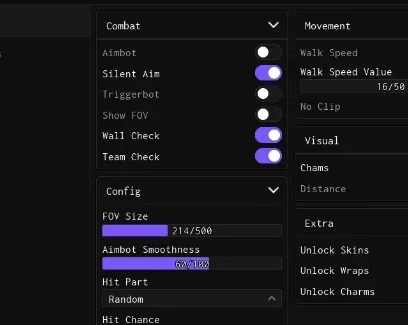
Track opponents, control how targets are selected, and adjust every shot before the duel reaches its fifth round. Silent Aim helps direct shots toward a valid target without constantly moving your camera, while Aimbot provides active aim assistance. Hit Part, Hit chance, and FOV circle let you decide where, how often, and within what area targeting can activate.
RIVALS normally rewards fast reactions and accurate shots. This setup also rewards knowing where the settings menu is.
Silent Aim redirects supported shots toward the selected opponent.
Aimbot actively follows a valid target.
Hit Part selects the body area used for targeting.
Hit chance controls how often assisted shots can connect.
FOV circle displays and limits the targeting area.
A smaller FOV keeps targeting closer to your crosshair. A larger one can include more opponents, including the player you definitely saw and did not discover through ESP two seconds ago.
Player Chams (ESP) adds a visible highlight to opponents, making them easier to track around arena objects. Distance ESP shows how far each marked player is from your position.
These features work well with the aim settings: ESP locates the opponent, the FOV determines whether they are a valid target, and the selected aim mode handles the next part of the conversation.
ESP finds them. Aim settings handle the introduction.
Unlock All Skins, Unlock All Charms, and Unlock All Wraps open the supported cosmetic selections through the script. They let you test different weapon appearances and combinations during the session without digging through cases and shop pages.
These options should be treated as cosmetic access provided by the script, not as confirmed permanent ownership added to the Roblox account.
Use Speed hacks to change ground movement, Fly to travel freely, and No clip to pass through supported map objects. They can help with movement testing and exploring arenas outside normal routes.
Customisable Keybinds lets you assign preferred controls to the main features. This is especially useful on smaller interfaces where opening the menu during a duel is an excellent way to become someone else’s win streak.
This script loads code from an external source. Review the URL and understand what it does before running it in Roblox.
https://raw.githubusercontent.com/imshrak/rivals/refs/heads/main/main





Comments
Loading comments…