
 Discord
132Views
92Copies
Jul 13Updated
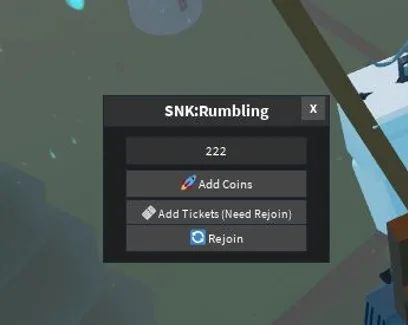
SNK: Rumbling puts you in the middle of the Rumbling, where missions and survival runs reward money used to unlock Titans, skins, particles, and other content. The script from XSigmaDevX skips the normal currency grind by letting you enter a custom amount for both Coins and Tickets.
INF Coins – Add Amount lets you choose how many Coins should be added instead of waiting for mission rewards. This is useful when you want to unlock more of the game’s content, test expensive purchases, or avoid repeating the same money grind.
The function uses a custom amount rather than a single fixed value. You can enter what you need instead of filling the balance with an unnecessarily large number.
Rejoin is part of the currency process, not just a quick server reset. According to the developer’s instructions, adding Coins may temporarily make the Ticket balance negative.
Use the functions in this order:
Enable INF Coins – Add Amount and enter the desired value.
Use Rejoin after the Coin amount has been applied.
Wait for the currency values to load normally.
Enter the amount you want to add to Tickets.
Following this order helps prevent the negative Ticket value from remaining on the screen. The published instructions specifically tell players to add Coins first, rejoin, and only then change Tickets.
This is a focused currency script rather than a large farming hub. It does not include automatic missions, combat, or movement tools. Its purpose is to change the Coin and Ticket amounts while providing the Rejoin option needed between the two steps.
Because both currencies are affected by the same process, avoid enabling everything at once. Add Coins, rejoin, check that the balance has loaded, and then continue with Tickets.
This script loads code from an external source. Review the URL and understand what it does before running it in Roblox.





Comments
Loading comments…