Snowcone Stand is built around blending flavors, stopping the machine at the right moment, serving finished cones, and reinvesting the cash into better stock and more space. Rare flavors appear through rotating shop inventory, so efficient buying matters as much as fast serving.
Ouroboros Hub automates the stand from preparation to sale, with separate controls for flavors, plants, timing, and spending.
Blend and serve cones automatically
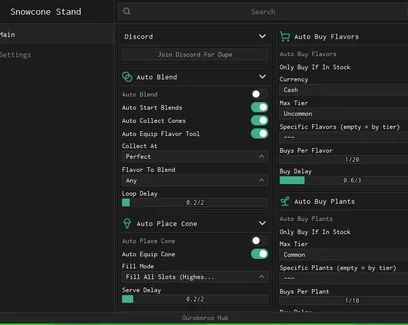
Choose a flavor, set the collection point, and enable Auto Start Blends. The script can equip the required flavor tool, begin each blend, collect completed cones, and repeat the process using your chosen delay.
The serving options continue the same cycle:
Auto Equip Cone prepares the finished cone.
Auto Place Cone puts it at the stand.
Fill Mode controls how the cone is filled or served.
Serve Delay sets the pause before the next action.
This removes the need to move between the blender and stand for every cone. Since badly timed blends can lose most of their value, the Collect At setting should be adjusted carefully before leaving the loop unattended.
Restock selected flavors and plants
Auto Buy Flavors can target specific flavors, limit purchases by tier, and buy several copies per shop cycle. Enable Only Buy Flavors If In Stock to avoid repeated attempts when a selected item is unavailable.
The plant buyer uses similar filters:
maximum plant tier;
selected plants;
purchases per cycle;
separate shop delay.
Plants can provide more flavors after they mature. Auto Harvest Plants collects the chosen crops, while Only Harvest Ripe Plants prevents early harvesting.
Use the Currency option carefully if the shop accepts more than one payment type. A lower maximum tier is safer when you want to save expensive currency for rarer stock.
Expand without spending all your cash
Auto Buy Land opens more room for blenders, plants, and other stand equipment. Set Keep Cash Reserve first so expansion does not use money needed for flavors or the next production cycle.
The hub can also claim completed quests automatically. Also Claim Tier Rewards collects the extra milestone rewards tied to quest progress, saving you from checking both reward menus manually.

 Discord




Comments
Loading comments…