
Storage Hunters: Open World script - (Auto Accept Offers, Autofarm)
Community:
 Discord
295Views
160Copies
Aug 12Updated
This Storage Hunters: Open World script by akkiwi is a no-key, mobile-friendly automation hub built around the game’s main money-making loop.
Storage Hunters is about bidding on storage lockers, loading valuable finds into your vehicle, taking them back to your shop, and selling them for profit. Better areas introduce more expensive containers, heavier items, mutations, grading, and higher-risk auctions. (roblox.com)
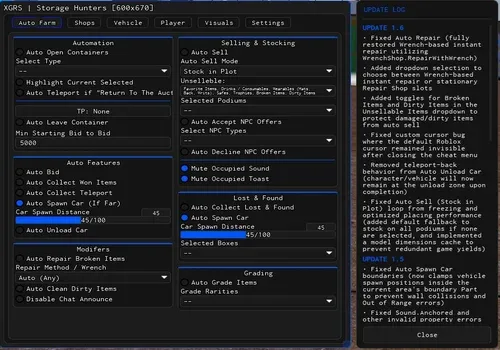
Akkiwi goes much further than a basic Auto Farm script. It can control bidding, choose which garages to visit, ignore unwanted item types, unload your truck, clean items, grade selected rarities, collect rewards, and automatically accept profitable offers.
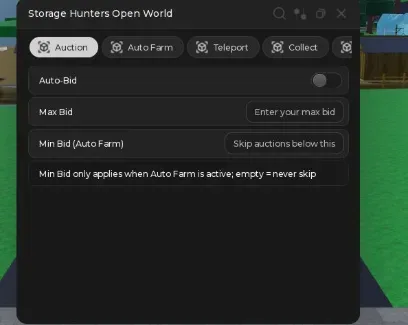
Auto-Bid automatically participates in supported storage auctions instead of making you press the bid button manually.
You can combine it with:
Max Bid to stop the script from overpaying;
Min Bid for Auto Farm to ignore auctions below your chosen value;
Garage Types to decide which storage types should be considered;
Prioritize Nearest to Vehicle to reduce unnecessary driving.
This matters because profit in Storage Hunters starts before you even open the locker. Paying too much for weak containers can erase the value of the items inside.
The Junkyard, for example, is the starter auction area and generally contains lower-value loot, while later areas can contain more valuable and heavier items. (storagehunters.wiki) (storagehuntersopenworld.org)
The Auto Farm system does more than blindly collect every object.
Akkiwi includes exclusion filters for:
Vehicles;
Weapons;
Epic items;
Junk;
Legendary items;
Limited items;
Lost items;
Mythical items.
This gives you control over what the farming route actually picks up.
For example, excluding Junk can prevent low-value objects from filling the truck, while excluding Vehicles can make sense when your current transport does not have enough capacity for large finds.
You can also use Place Every N Containers to control how often the script performs its placement or storage action during repeated farming.
This is especially useful later in progression, where bulky items can make transportation just as important as winning the auction itself. Farmyard loot, for example, includes large animals and agricultural equipment that can expose the limits of smaller vehicles. (storagehuntersopenworld.org)
Akkiwi includes direct teleports to several important locations:
TP Base
TP to JunkYard
TP to Back Alley
TP to Farm Yard
TP to ShipYard
TP Mall
These options cut out repeated driving when you only need to reach the next auction, shop service, or selling area.
The locations are useful for different stages of progression. Junkyard introduces the basic auction loop, while later zones such as Farmyard and Shipyard contain higher-value loot pools and more demanding transportation. (storagehunters.wiki)
Auto-Accept Offers handles incoming buyer offers automatically.
The important setting here is Min Accept %.
Instead of accepting every offer, you can choose the minimum percentage you consider worth taking. This prevents the script from immediately selling an item when the offer is too low.
A practical setup is to use a higher minimum for valuable or mutated items and a lower threshold for common loot you simply want to clear out.
Storage Hunters is built around reselling finds for profit, so automatically accepting offers without a minimum threshold can defeat the point of winning a good locker in the first place. (roblox.com)
Unload Truck removes collected items from your vehicle after returning from an auction.
Auto-Collect then handles supported collection actions around the base or selling process.
Together with Auto Farm, these functions reduce the repetitive part between auctions:
Win a storage unit.
Collect selected loot.
Load the vehicle.
Return to your base.
Unload the truck.
Process or sell the items.
Start the next auction.
This is one of the reasons akkiwi is more complete than a simple Auto Bid script. It continues working after the auction instead of stopping when the container is won.
Auto Wash sends or processes supported items through the game’s cleaning system.
Cleaning matters because item condition can affect selling value. Community value data currently lists Dirty as a negative-value mutation, while cleaner or stronger mutations can increase the final price. (storagehuntersroblox.com)
Use Auto Wash when you want dirty items cleaned before they are offered for sale.
There is also an Item Cleaning Service option, giving the script another way to interact with the game’s cleaning process when supported.
Auto Grade sends chosen items through the grading system automatically.
The Rarities to Grade option is important because grading is not automatically profitable for every item.
Community data for the current grading system lists four possible outcomes:
Replica — below the normal appraised value;
One-Star — also below full value;
Two-Star — higher value;
Three-Star — significantly higher value.
That means grading is a risk rather than a guaranteed upgrade. (storagehuntersroblox.com)
Use the rarity filter to avoid grading cheap items where a bad result would not be worth the gamble.
Akkiwi covers several separate systems that would normally require manual attention:
Auction automation
Auto Bid
Max Bid
Garage selection
Nearest-auction priority
Loot filtering
Rarity exclusions
Vehicle and weapon exclusions
Lost-item filtering
Transportation
Area teleports
Truck unloading
Item processing
Cleaning
Washing
Grading
Selling
Auto-Accept Offers
Minimum offer percentage
Because these systems are connected, this script is most useful for long farming sessions where you want the whole auction-to-sale cycle to keep moving.
Open Storage Hunters: Open World and wait for your vehicle, inventory, and current area to load.
Copy the akkiwi script from the script block.
Open a compatible Roblox executor.
Paste the script and press Execute.
Choose the Garage Types you want to farm.
Set a Max Bid before enabling Auto-Bid.
Configure the loot exclusions so the truck does not fill with items you do not want.
Enable Auto Farm and test one auction first.
Set your Min Accept % before turning on Auto-Accept Offers.
Configure Rarities to Grade before enabling Auto Grade.
Add Auto Wash and truck unloading only after the main farming route is working correctly.
Use Anti-AFK for longer sessions.
Start with conservative bid and selling settings. The script can automate bad decisions just as quickly as profitable ones if Max Bid or Min Accept % are configured poorly.
Storage Hunters: Open World is a new game and its economy, areas, containers, and item systems are still being updated. The game launched in June 2026 and has already developed multiple progression zones and value systems. (storage-hunters-open-world.wiki)
Akkiwi may need an update if the game changes:
auction remotes;
storage types;
item rarities;
vehicle loading;
shop offers;
cleaning;
grading;
teleport locations.
Possible signs of an outdated version include Auto Bid ignoring your maximum, Auto Farm collecting excluded items, the truck failing to unload, or Auto-Accept accepting offers below your chosen percentage.
Using third-party scripts and Roblox executors may violate Roblox rules and can lead to account penalties.
This script loads code from an external source. Review the URL and understand what it does before running it in Roblox.
https://raw.githubusercontent.com/femmehomme90-web/RayVoid_Scripts/main/Storage-Hunters-Open-World
1loadstring(game:HttpGet("https://raw.githubusercontent.com/femmehomme90-web/RayVoid_Scripts/main/Storage-Hunters-Open-World"))()by Absolute Zero! · 3 scripts · 555 views





Browse
Script Types
Tools
Community

Comments
Loading comments…