Throw a Coin turns luck into a simple money loop: toss a coin into the fountain, receive an item, sell the loot, and spend the cash on better odds and stronger coins. Ouroboros Hub automates that full cycle while still letting you control what gets sold and how much money stays untouched.
Keep the fountain running
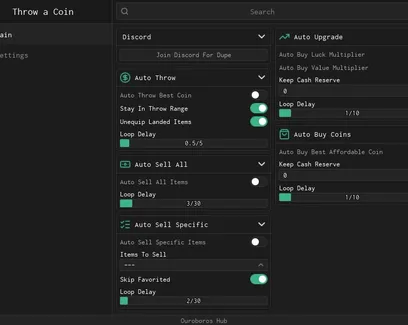
Auto Throw Best Coin selects the strongest coin you currently own and continues throwing it for you. This removes the repeated manual tosses that make up most of the early and mid-game grind.
Stay In Throw Range keeps your character close enough to the fountain for each throw to register. It is useful when movement, knockback, or an uneven position causes automatic throws to miss the valid area.
The throwing loop also includes two extra controls:
Unequip Landed Items clears items after they land, helping the next throw continue without an old item staying equipped.
Auto Throw Loop Delay sets the pause between throws.
A shorter delay can produce loot faster, while a slightly longer delay may work better when the server is busy or items take time to appear.
Turn unwanted drops into cash
Not every item from the fountain is worth keeping. The selling tools let you clear inventory space and convert common drops into money without checking each item by hand.
There are two ways to set up the selling loop:
Sell everything you do not need
Auto Sell All Items repeatedly sells the available inventory. This is the fastest option when your goal is cash and you are not collecting specific items.
Enable Skip Favorited Items before using it if you have rare or important drops marked as favorites. That keeps those items protected while the rest of the inventory is sold.
Sell only selected items
Auto Sell Specific Items is safer for players who want to build a collection. Use Items To Sell to choose the common or low-value drops that should be removed.
This setup makes sense when you want to keep rare fountain rewards but still stop weaker items from filling the inventory.
Auto Sell All Loop Delay and Auto Sell Specific Loop Delay control how often each selling check runs. You can slow the loop down if new items need extra time to load after a throw.
Improve luck and item value together
Throw a Coin has two different upgrade paths, and they affect different parts of progression.
Auto Buy Luck Multiplier improves the chance of receiving better loot from the fountain.
Auto Buy Value Multiplier increases how much money your items are worth when sold.
Luck is useful when you are chasing rare drops. Value is more helpful when you want every normal item to produce more cash. Buying both creates a balanced loop: better loot appears more often, and each sale helps fund the next upgrade.
Keep Cash Reserve For Upgrades stops automatic purchases from using your entire balance. Set aside enough money for the next upgrade instead of letting the hub spend every coin as soon as it becomes available.
The Auto Upgrade Loop Delay decides how frequently the hub checks whether another multiplier can be purchased.
Move through better coin tiers
Auto Buy Best Affordable Coin checks your current balance and purchases the strongest coin you can afford. Better coins support the main progression loop by giving you access to stronger throws and better chances at valuable rewards.
The reserve option gives you more control over that spending:
Set Keep Cash Reserve For Coins to the amount you do not want the hub to touch.
Enable Auto Buy Best Affordable Coin.
Adjust Auto Buy Coins Loop Delay to control how often the shop is checked.
Let item sales build enough money for the next available coin.
Keeping a reserve is useful when you are saving for a multiplier at the same time. Without it, the hub may spend your full balance on a coin and delay another upgrade you planned to buy.
Build a loop around your current goal
For fast cash, use Auto Throw with Auto Sell All and the Value Multiplier. For rare-item hunting, raise Luck and sell only selected common drops. Players who want steady progress can keep both upgrade buyers active while using separate cash reserves for multipliers and new coins.
The important part is choosing what the hub should protect. Favorite rare items, select what can be sold, and leave enough cash in reserve before starting the automatic loop.

 Discord






Comments
Loading comments…