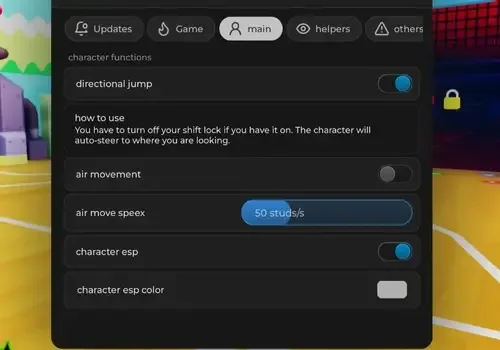
Volleyball Legends depends on jump timing, court position, and making contact with the ball in midair. Hitbox Expander changes the available contact area, while Directional Jump and Air Movement let the character adjust position after leaving the ground. Together, they support serves, spikes, blocks, and difficult saves.
Better Control Above the Court
Midair movement is the main part of this setup. Instead of following one fixed jump path waiting for the character to land, players can correct their direction while airborne. The movement speed remains adjustable, so the effect can be matched to different positions and play styles.
The serving controls form their own connected sequence:
Auto Serve starts the serving action.
Adjustable Serve Power controls the selected power.
Jump After Serve prepares the character for an airborne hit.
Adjustable Spike Delay changes when the follow-up spike happens.
For a more controlled setup:
Begin with a small hitbox increase.
Choose a visible custom hitbox color.
Adjust air movement speed during practice.
Test serve power and spike delay separately.
Use Reset Movement Settings if the current values become difficult to control.
Extreme movement or hitbox settings may feel less precise. Start low and increase them gradually.
Court information | Display control | Purpose |
|---|
Player positions | Character ESP | Follow teammates and opponents through the court |
Player direction | ESP Lines | Make positioning easier to read |
Distant players | Adjustable ESP Line Length | Control how far the guide lines extend |
Wider court view | Adjustable Field of View | Show more of the current play |
A possible match sequence is:
Start the serve
Choose power
Jump toward the ball
Correct position in midair
Make contact
Return to court position
Movement and Position Tools
Lock Position can hold the character at the chosen spot, while walk speed, jump height, flight, and TP Walk provide different ways to move around the court. Each major movement mode includes its own adjustment, including fly speed and the TP Walk multiplier.
Noclip and Infinite Jump provide freer movement, while Disable Animations changes how character actions are displayed. The included reset option makes it possible to clear the custom movement setup without changing every value manually.
Comments
Loading comments…