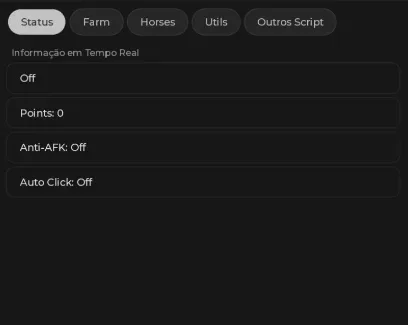

Mobile-friendly, keyless automation for Wild Horse Islands. This script handles 1st and 2nd tier horse training, automated flying, and click farming. Note that this script is currently in an unstable state and may not function perfectly during execution.
What This Script Does
Horse Training Automation
1st Auto Training and 2nd Auto Training: Automates the specific training routines for early and mid-tier horses.
Next Horse: Automatically progresses to the next available horse once the current training cycle is complete.
Movement and Navigation
Fly to Wild Horse and Fly Farm: Unlocks flight specifically routed to horse locations and farming spots.
Speed and Height: Customizable sliders to adjust flight velocity and altitude to avoid map geometry clipping.
Utility and Control
Auto Click and Farm speed changer: Automates interaction prompts and allows you to adjust the tick rate of the farming loop.
Anti-AFK: Prevents server disconnection during long sessions.
Shut Everything Down: A panic button that instantly disables all active functions and hides the GUI.
Critical Limitation: Stability and Execution Bugs
The developer explicitly notes that this script may not work 100% correctly. You may encounter pathing errors, missed auto-clicks, or GUI glitches.
Decision Impact: This script is not recommended for completely unattended overnight AFK farming. It is best used for semi-active supervision where you can manually intervene if the auto-training gets stuck.
Why Choose This Script
Zero Friction Access: Completely keyless and natively mobile-friendly, requiring no Discord verification or PC-only executors.
Dedicated Training Logic: Unlike generic auto-clickers, it includes specific logic for 1st and 2nd tier horse training routines.
Emergency Override: The "Shut Everything Down" feature provides a quick way to normalize your client if a moderator joins or the script begins behaving erratically.
How to Use
Launch Wild Horse Islands on Roblox.
Open your PC or mobile executor.
Inject the executor and paste the script.
Execute the script and open the GUI.
Enable 1st or 2nd Auto Training depending on your current horse tier.
Adjust the Farm speed changer and Height to prevent getting stuck on terrain.
Keep the GUI open to monitor for any pathing or clicking errors.
FAQ
What does it mean that the script "may not work 100% correctly"?
The script is currently experiencing occasional bugs, such as failing to click a prompt, flying into a wall, or skipping a training step. The developer has released it in its current state, so users should expect to manually fix minor issues if the automation loop breaks.
What is the difference between 1st and 2nd Auto Training?
These toggles correspond to the specific training minigames or routines required for different horse tiers. Use 1st Auto Training for beginner horses and switch to 2nd Auto Training as you progress to higher-tier mounts.
What does the "Shut Everything Down" button do?
It acts as a master kill-switch. If the script starts causing lag, behaving erratically, or if you need to hide your activity quickly, this button instantly turns off all active features and closes the interface.
Can I adjust how fast the script farms?
Yes. The "Farm speed changer" slider allows you to increase or decrease the delay between actions. If the script is bugging out or missing clicks, try lowering the farm speed to give the game server more time to register the interactions.
Is there a key system or Discord verification required?
No. This script is completely keyless and is specifically optimized to work on mobile executors without complex verification steps.
Comments · …
Loading comments…