 Aisles Of The LocustNO KEY
Aisles Of The Locust Script - (ESP, Walkspeed modifier)
Tested Nov 2, 2026 · Partially working60Views
43Copies
Nov 2Tested
Aisles Of The LocustNO KEYTested by bebra · BobloScript editorial team · Nov 2, 2026
Test setup: PC and Android · Potassium (PC), Delta (Android)
All 16 listed features checked · See marks in Functions
Tested on PC with Potassium and on Android with Delta. Auto-grab collected items within prompt range, the Locust and exit highlights drew through walls, and darkness and fog removal both applied and restored the original lighting when switched off. CFrame speed held where a plain speed value would have been reset, jump power and infinite jump both worked, and cart and model removals took effect on the client. The one recurring problem was the ESP style selector, which frequently needed a second attempt before the new style appeared.
The ESP style selector does not always take effect on the first change. If the outlines keep the old style, reselect the option or toggle the ESP entries off and on. The Locust and exit highlights themselves worked.
This reflects one test at a specific point in time, not an ongoing guarantee. How we test scripts
The menu splits into a visual layer and a mechanical one. The visual side changes what you can see in a dark supermarket — the entity, the exit, the light and the fog — while the mechanical side changes what your character can do. They are set independently, so a run can use the ESP and lighting alone without touching movement.
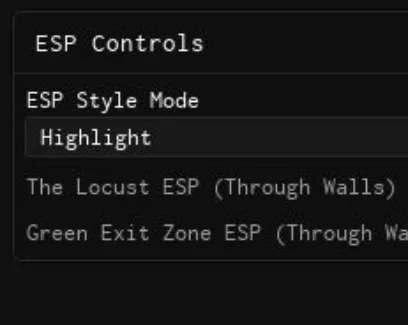
Two separate toggles handle the Locust and the green exit zone, each with its own colour picker, so the two cannot be confused at a glance. The style selector decides how both are drawn: Highlight fills the model, Box outlines it, and Both draws the fill with an outline around it. Outlines are redrawn on a short interval rather than once, which is why a target that spawns or moves keeps its outline.
One caveat on the style selector: changing it does not always take effect on the first try, and the outlines can keep the previous style until the toggle is switched off and on again. If a style change appears to do nothing, reselect it before assuming the ESP itself is broken — the Locust and exit toggles themselves have been reliable.
Removing darkness raises ambient light and turns off global shadows, which is what makes aisles readable without a light source. Removing fog is the heavier option: it pushes fog distance out and detaches the atmosphere and post-processing objects from the scene, so the map loses depth as well as haze. Both entries store the original values before changing anything and put them back when switched off, so a run can be returned to the intended look without rejoining.
Auto-grab fires any proximity prompt within its own activation distance, so it picks up items as you walk past them rather than teleporting you to each one. Speed is changed by moving the character through CFrame instead of setting walk speed, which is what lets it hold where a plain speed value would be reset; the slider sets the multiplier and the default sits close to normal walking. Jump is unlocked the same way, with a separate power slider and an infinite-jump toggle for repeated mid-air jumps.
The cart buttons remove shopping carts, then their wheels and legs, and a third removes your own character's legs. These act on your client only, so they change what you see and collide with rather than what other players see. Deleting the Locust model works the same way: it removes the entity from your view for the rest of the session, and a respawn or rejoin brings it back.
The inventory entry re-enables the backpack and any inventory or hotbar interface that the game hid, and it runs again automatically after a respawn. Rejoin and server hop are there for the cases where a session has gone bad and a fresh one is faster than fixing it.
Pick the ESP style before enabling the entity and exit toggles, and confirm the outlines look the way you wanted.
Set colours for the two highlights so they stay distinct.
Remove darkness first and fog second — fog removal is the one that changes the look most.
Turn on auto-grab and the movement settings last, once you know the aisles you are heading for.
Tested on PC with Potassium and on Android with Delta.
Windows
 Madium
 Potassium
 Real
 Sirhurt
 Velocity
 Volt
 Wave
 Volcano
Android
 Delta
iOS
DeltamacOS
 Opiumware
Windows
 Solara
 Xeno
This script loads code from an external source. Review the URL and understand what it does before running it in Roblox.
https://raw.githubusercontent.com/deividcomsono/Obsidian/main/
1--[[2 Baltika Hub | [AOTL]3 Game: Aisles Of The Locust [AOTL]4 UI Library: Obsidian UI5]]67local repo = "https://raw.githubusercontent.com/deividcomsono/Obsidian/main/"8local Library = loadstring(game:HttpGet(repo .. "Library.lua"))()910local ThemeManager, SaveManager11pcall(function()12 ThemeManager = loadstring(game:HttpGet(repo .. "addons/ThemeManager.lua"))()13 SaveManager = loadstring(game:HttpGet(repo .. "addons/SaveManager.lua"))()14end)1516local Options = Library.Options17local Toggles = Library.Toggles1819local Window = Library:CreateWindow({20 Title = "Baltika Hub | [AOTL]",21 Footer = "Baltika Hub | [AOTL] Edition",22 Icon = "rbxassetid://4384403532",23 NotifySide = "Right",24 ShowCustomCursor = false,25 EnableCompacting = true,26 SidebarCompacted = true27})2829local Tabs = {30 Visual = Window:AddTab("Visuals", "eye"),31 Player = Window:AddTab("Player", "person-standing"),32 Server = Window:AddTab("Server & Map", "atom"),33 UISettings = Window:AddTab("UI Settings", "cog")34}3536local Players = game:GetService("Players")37local RunService = game:GetService("RunService")38local Workspace = game:GetService("Workspace")39local Lighting = game:GetService("Lighting")40local TeleportService = game:GetService("TeleportService")41local UserInputService = game:GetService("UserInputService")42local StarterGui = game:GetService("StarterGui")43local LocalPlayer = Players.LocalPlayer4445---------------------------------------------------------46-- 1. VISUALS (ИСПРАВЛЕННАЯ СМЕНА СТИЛЯ И ВОЗВРАТ ОСВЕЩЕНИЯ)47---------------------------------------------------------48local VisGroup = Tabs.Visual:AddLeftGroupbox("ESP Controls")4950local ESP_Storage = {}5152local function ClearESP()53 for _, v in pairs(ESP_Storage) do54 if v and v.Parent then v:Destroy() end55 end56 table.clear(ESP_Storage)57end5859VisGroup:AddDropdown("ESPStyle", {60 Values = { "Highlight", "Box", "Both" },61 Default = 1,62 Multi = false,63 Text = "ESP Style Mode",64 Callback = function()65 ClearESP() -- Очистка элементов при смене стиля66 end67})6869VisGroup:AddToggle("MonsterESP", { Text = "The Locust ESP (Through Walls)", Default = false }):AddColorPicker("MonsterColor", { Default = Color3.fromRGB(255, 30, 30) })70VisGroup:AddToggle("ExitESP", { Text = "Green Exit Zone ESP (Through Walls)", Default = false }):AddColorPicker("ExitColor", { Default = Color3.fromRGB(0, 255, 120) })7172local VisLightGroup = Tabs.Visual:AddRightGroupbox("Lighting & Fog Removal")7374-- Сохранение оригинального освещения карты75local OriginalLighting = {76 Ambient = Lighting.Ambient,77 OutdoorAmbient = Lighting.OutdoorAmbient,78 Brightness = Lighting.Brightness,79 GlobalShadows = Lighting.GlobalShadows80}8182VisLightGroup:AddToggle("Fullbright", {83 Text = "Remove Darkness & Shadows",84 Default = false,85 Callback = function(Value)86 if Value then87 OriginalLighting.Ambient = Lighting.Ambient88 OriginalLighting.OutdoorAmbient = Lighting.OutdoorAmbient89 OriginalLighting.Brightness = Lighting.Brightness90 OriginalLighting.GlobalShadows = Lighting.GlobalShadows9192 Lighting.Ambient = Color3.fromRGB(255, 255, 255)93 Lighting.OutdoorAmbient = Color3.fromRGB(255, 255, 255)94 Lighting.Brightness = 295 Lighting.GlobalShadows = false96 else97 -- Возврат оригинальной темноты98 Lighting.Ambient = OriginalLighting.Ambient99 Lighting.OutdoorAmbient = OriginalLighting.OutdoorAmbient100 Lighting.Brightness = OriginalLighting.Brightness101 Lighting.GlobalShadows = OriginalLighting.GlobalShadows102 end103 end104})105106local SavedAtmospheres = {}107108VisLightGroup:AddToggle("NoFog", {109 Text = "Remove Fog (Complete Clean)",110 Default = false,111 Callback = function(Value)112 if Value then113 Lighting.FogEnd = 1e6114 Lighting.FogStart = 0115 for _, obj in pairs(Lighting:GetChildren()) do116 if obj:IsA("Atmosphere") or obj:IsA("DepthOfFieldEffect") or obj:IsA("PostEffect") then117 table.insert(SavedAtmospheres, {Obj = obj, Parent = obj.Parent})118 obj.Parent = nil119 end120 end121 for _, obj in pairs(Workspace:GetChildren()) do122 if obj:IsA("Atmosphere") or obj:IsA("DepthOfFieldEffect") then123 table.insert(SavedAtmospheres, {Obj = obj, Parent = obj.Parent})124 obj.Parent = nil125 end126 end127 else128 Lighting.FogEnd = 1000129 Lighting.FogStart = 0130 for _, item in pairs(SavedAtmospheres) do131 if item.Obj and item.Parent then132 item.Obj.Parent = item.Parent133 end134 end135 table.clear(SavedAtmospheres)136 end137 end138})139140-- Стабильный цикл отрисовки ESP141task.spawn(function()142 while task.wait(0.3) do143 ClearESP()144 local char = LocalPlayer.Character145 local mode = Options.ESPStyle and Options.ESPStyle.Value or "Highlight"146147 -- Подсветка "The Locust" сквозь стены148 if Toggles.MonsterESP and Toggles.MonsterESP.Value then149 for _, obj in pairs(Workspace:GetDescendants()) do150 if obj:IsA("Model") and obj ~= char then151 local isLocustName = obj.Name == "The Locust" or obj.Name:lower():find("locust") or obj.Name:lower():find("bug")152 local hasLocustFolder = obj:FindFirstChild("LocustAnimations") ~= nil153 local isNotPlayer = not Players:GetPlayerFromCharacter(obj)154155 if (isLocustName or hasLocustFolder) and isNotPlayer then156 if mode == "Highlight" or mode == "Both" then157 local hl = Instance.new("Highlight")158 hl.FillColor = Options.MonsterColor.Value159 hl.OutlineColor = Color3.fromRGB(255, 255, 255)160 hl.DepthMode = Enum.HighlightDepthMode.AlwaysOnTop161 hl.Adornee = obj162 hl.Parent = obj163 table.insert(ESP_Storage, hl)164 end165 if mode == "Box" or mode == "Both" then166 local box = Instance.new("SelectionBox")167 box.Color3 = Options.MonsterColor.Value168 box.LineThickness = 0.05169 box.AlwaysOnTop = true170 box.Adornee = obj171 box.Parent = obj172 table.insert(ESP_Storage, box)173 end174 end175 end176 end177 end178179 -- Зелёная зона выхода сквозь стены180 if Toggles.ExitESP and Toggles.ExitESP.Value then181 for _, obj in pairs(Workspace:GetDescendants()) do182 if obj.Name:lower():find("exit") or obj.Name:lower():find("spawn") or obj.Name:lower():find("escape") or obj:IsA("SpawnLocation") then183 if mode == "Box" then184 local box = Instance.new("SelectionBox")185 box.Color3 = Options.ExitColor.Value186 box.AlwaysOnTop = true187 box.Adornee = obj188 box.Parent = obj189 table.insert(ESP_Storage, box)190 else191 local hl = Instance.new("Highlight")192 hl.FillColor = Options.ExitColor.Value193 hl.OutlineColor = Color3.fromRGB(255, 255, 255)194 hl.DepthMode = Enum.HighlightDepthMode.AlwaysOnTop195 hl.Adornee = obj196 hl.Parent = obj197 table.insert(ESP_Storage, hl)198 end199 end200 end201 end202 end203end)204205---------------------------------------------------------206-- 2. PLAYER (INVENTORY, JUMP & SPEED)207---------------------------------------------------------208local InvGroup = Tabs.Player:AddLeftGroupbox("Inventory Controls")209210InvGroup:AddButton({211 Text = "Restore / Unlock Inventory",212 Func = function()213 pcall(function() StarterGui:SetCoreGuiEnabled(Enum.CoreGuiType.Backpack, true) end)214 local pgui = LocalPlayer:FindFirstChildOfClass("PlayerGui")215 if pgui then216 for _, v in pairs(pgui:GetDescendants()) do217 if v.Name:lower():find("inventory") or v.Name:lower():find("hotbar") or v.Name:lower():find("item") then218 if v:IsA("Frame") or v:IsA("TextButton") then219 v.Visible = true220 elseif v:IsA("ScreenGui") then221 v.Enabled = true222 end223 end224 end225 end226 end227})228229local PlayerLocustGroup = Tabs.Player:AddLeftGroupbox("Locust Management")230231PlayerLocustGroup:AddButton({232 Text = "Delete Locust Model",233 Func = function()234 for _, obj in pairs(Workspace:GetDescendants()) do235 if obj.Name == "The Locust" or obj.Name:lower():find("locust") then236 obj:Destroy()237 end238 end239 end240})241242local JumpGroup = Tabs.Player:AddLeftGroupbox("Jump Mechanics Fixer")243244JumpGroup:AddToggle("UnlockJump", { Text = "Bypass & Unlock Jump Mechanics", Default = false })245JumpGroup:AddSlider("JumpPowerVal", { Text = "Jump Height Power", Default = 50, Min = 30, Max = 150, Rounding = 0 })246JumpGroup:AddToggle("InfJump", { Text = "Infinite Jump", Default = false })247248local MoveGroup = Tabs.Player:AddRightGroupbox("Movement & Speed")249250MoveGroup:AddToggle("BypassSpeed", { Text = "Bypass Speed (CFrame)", Default = false })251MoveGroup:AddSlider("SpeedVal", { Text = "Speed Multiplier", Default = 22, Min = 16, Max = 70, Rounding = 0 })252253-- Разблокировка прыжка254task.spawn(function()255 while task.wait(0.1) do256 if LocalPlayer.Character then257 local hum = LocalPlayer.Character:FindFirstChildOfClass("Humanoid")258 if hum and Toggles.UnlockJump and Toggles.UnlockJump.Value then259 hum.UseJumpPower = true260 hum.JumpPower = Options.JumpPowerVal.Value261 hum:SetStateEnabled(Enum.HumanoidStateType.Jumping, true)262 end263264 if Toggles.UnlockJump and Toggles.UnlockJump.Value then265 local pgui = LocalPlayer:FindFirstChildOfClass("PlayerGui")266 if pgui then267 local touchGui = pgui:FindFirstChild("TouchGui")268 if touchGui then269 local jumpBtn = touchGui:FindFirstChild("JumpButton", true)270 if jumpBtn then jumpBtn.Visible = true end271 end272 end273 end274 end275 end276end)277278UserInputService.JumpRequest:Connect(function()279 if LocalPlayer.Character then280 local hum = LocalPlayer.Character:FindFirstChildOfClass("Humanoid")281 if hum then282 if (Toggles.UnlockJump and Toggles.UnlockJump.Value) or (Toggles.InfJump and Toggles.InfJump.Value) then283 hum:ChangeState(Enum.HumanoidStateType.Jumping)284 end285 end286 end287end)288289-- Обход скорости290RunService.Heartbeat:Connect(function(dt)291 if LocalPlayer.Character and LocalPlayer.Character:FindFirstChild("HumanoidRootPart") then292 local hrp = LocalPlayer.Character.HumanoidRootPart293 local hum = LocalPlayer.Character:FindFirstChildOfClass("Humanoid")294295 if Toggles.BypassSpeed and Toggles.BypassSpeed.Value then296 if hum and hum.MoveDirection.Magnitude > 0 then297 hrp.AssemblyLinearVelocity = Vector3.zero298 hrp.CFrame = hrp.CFrame + (hum.MoveDirection * (Options.SpeedVal.Value / 10) * dt * 10)299 end300 end301 end302end)303304---------------------------------------------------------305-- 3. SERVER & MAP (AUTO-GRAB, CARTS & LEGS REMOVAL)306---------------------------------------------------------307local AutoGroup = Tabs.Server:AddLeftGroupbox("Automation")308309AutoGroup:AddToggle("NearAutoGrab", { Text = "Auto-Grab Nearby Items", Default = false })310311task.spawn(function()312 while task.wait(0.25) do313 if Toggles.NearAutoGrab and Toggles.NearAutoGrab.Value and LocalPlayer.Character then314 local hrp = LocalPlayer.Character:FindFirstChild("HumanoidRootPart")315 if hrp then316 for _, prompt in pairs(Workspace:GetDescendants()) do317 if prompt:IsA("ProximityPrompt") then318 local part = prompt.Parent:IsA("BasePart") and prompt.Parent or prompt.Parent:FindFirstChildWhichIsA("BasePart")319 if part and (part.Position - hrp.Position).Magnitude <= prompt.MaxActivationDistance then320 fireproximityprompt(prompt)321 end322 end323 end324 end325 end326 end327end)328329local CartCleanGroup = Tabs.Server:AddRightGroupbox("Shopping Cart Clean")330331CartCleanGroup:AddButton({332 Text = "Delete Shopping Carts",333 Func = function()334 for _, obj in pairs(Workspace:GetDescendants()) do335 if obj.Name:lower():find("cart") or obj.Name:lower():find("trolley") then336 obj:Destroy()337 end338 end339 end340})341342CartCleanGroup:AddButton({343 Text = "Delete Cart Wheels / Legs",344 Func = function()345 for _, obj in pairs(Workspace:GetDescendants()) do346 if obj.Name:lower():find("wheel") or obj.Name:lower():find("leg") then347 if obj.Parent and (obj.Parent.Name:lower():find("cart") or obj.Parent.Name:lower():find("trolley")) then348 obj:Destroy()349 end350 end351 end352 end353})354355CartCleanGroup:AddButton({356 Text = "Delete Player Legs",357 Func = function()358 if LocalPlayer.Character then359 for _, p in pairs(LocalPlayer.Character:GetChildren()) do360 if p:IsA("BasePart") and (p.Name:find("Leg") or p.Name:find("Foot")) then361 p:Destroy()362 end363 end364 end365 end366})367368---------------------------------------------------------369-- 4. UI SETTINGS & REJOIN370---------------------------------------------------------371local ServerControl = Tabs.UISettings:AddLeftGroupbox("Server Options")372373ServerControl:AddButton({374 Text = "Rejoin Server",375 Func = function()376 TeleportService:TeleportToPlaceInstance(game.PlaceId, game.JobId, LocalPlayer)377 end378})379380ServerControl:AddButton({381 Text = "Server Hop (New Server)",382 Func = function()383 TeleportService:Teleport(game.PlaceId, LocalPlayer)384 end385})386387-- Восстановление после смерти388LocalPlayer.CharacterAdded:Connect(function(char)389 char:WaitForChild("HumanoidRootPart")390 task.wait(1)391 pcall(function() StarterGui:SetCoreGuiEnabled(Enum.CoreGuiType.Backpack, true) end)392end)393394if ThemeManager and SaveManager then395 ThemeManager:SetLibrary(Library)396 SaveManager:SetLibrary(Library)397 SaveManager:IgnoreThemeSettings()398 SaveManager:SetIgnoreIndexes({ "MenuKeybind" })399 ThemeManager:SetFolder("BaltikaProject")400 SaveManager:SetFolder("BaltikaProject/AOTL")401 SaveManager:BuildConfigSection(Tabs.UISettings)402 ThemeManager:ApplyToTab(Tabs.UISettings)403end404405Library.ToggleKeybind = Options.MenuKeybind406Library:SelectTab(1)by Tether Community · 1 script · 60 views

Browse
Script Types
Tools
Community
Comments
Loading comments…