 Anime ExpeditionsNO KEY
[NO KEY] Anime Expeditions script - (Expensive Hub)
 Discord
 Showcase
174Views
105Copies
NeverUpdated
Anime ExpeditionsNO KEYExpensive Hub is a keyless Anime Expeditions script built around a network-level macro recorder. Instead of giving you one preset layout that may not match your units, the hub records the round you play yourself.
Place units, upgrade them, change priority, and sell when needed. The macro reads these actions through the game’s data layer rather than tracking pixels or fixed mouse coordinates. This makes the recording less dependent on screen resolution, camera position, or the server where it was created.
The replay also checks two important conditions before continuing:
Wave timing: an action waits for its recorded wave instead of relying only on a stopwatch.
Available Yen: placements and upgrades wait until you can afford their real cost.
If a placement fails, the hub can retry it. If a unit was never placed successfully, later actions connected to that unit can be skipped instead of trying to upgrade or sell something that does not exist.
This is especially useful when lag, frame drops, or a different game speed would normally push a basic timed macro out of sync.
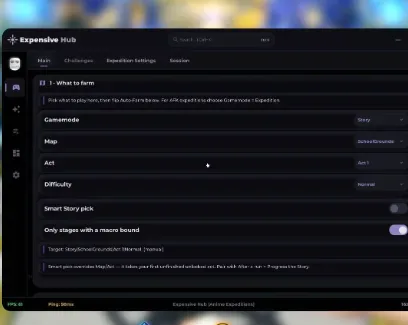
The stage panel lets you choose the gamemode, map, act, and difficulty manually, but it can also handle story progression automatically.
Smart Story Pick is intended to find an unfinished act that is already unlocked on your account. After completing one act, the next farming run can move forward instead of repeating a cleared stage or trying to enter locked content.
You can combine this with:
Only Stages With a Macro Bound to avoid starting a map that has no prepared route;
manual map and act selection when farming one specific reward;
a selected difficulty;
an upgrade cap to stop units at the level required by your recorded strategy.
This makes the hub suitable for two different jobs: advancing through Story or repeatedly farming a stage that your team can already clear consistently.
Challenge automation can refresh the available list, start a selected challenge, and continue farming supported challenges automatically.
The challenge controls include:
Challenge Selection for choosing the activity you need;
Refresh Challenge List to update the available options;
Start Selected Challenge for a single run;
Auto-Farm Challenges for repeated clears;
Only Stages With a Macro Bound to prevent unsupported routes from starting.
For supported checkpoint or payload activities, the hub can also manage practical run limits. Max Farm Units controls how many farming units are used, while Buy Payload Repair When Low can respond when the payload needs recovery. Hire Units at Checkpoints supports runs where additional units become available during progression.
These settings matter because the safest Challenge route is not always the route with the most placements. A farm-unit limit and upgrade cap can preserve Yen for the placements that actually keep the run alive.
The summon panel is designed for controlled banner farming rather than spending everything as soon as Auto-Summon is enabled.
You can select:
the banner;
the number of summons in each batch;
a target unit;
a minimum amount of currency to keep;
one manual summon or continuous Auto-Summon.
Keep Currency Reserve is the most important protection in this group. It lets you leave part of your balance untouched for upgrades, future banners, or other progression systems instead of allowing the hub to consume the entire amount.
Use Refresh Banners after rotations or game updates so the current selection is loaded before starting a long summon session.
Expensive Hub can automate repeated rerolls for one selected unit.
Choose the Reroll Target Unit, select the Desired Traits, and then use a single reroll or enable Auto-Trait-Reroll. The automation can continue until one of the selected results is reached or the available reroll resources run out.
The Stat Potential Reroll and Target Grade settings provide a similar goal-based process for potential grades. Instead of accepting every roll manually, you define the result the hub should look for.
Reroll resources can disappear quickly, so these tools are more useful after you have chosen a unit worth keeping. Set the target unit and desired result carefully before enabling continuous rerolls.
The feeding panel reduces the repeated work of selecting the same unit and food materials.
Choose:
the unit you want to improve;
the food material or units to consume;
Feed Once for a controlled action;
Auto-Feed for repeated feeding.
Use Refresh Unit List whenever your inventory changes or a newly obtained unit does not appear immediately. Selecting the target again before Auto-Feed helps prevent resources from being used on the wrong unit.
Long farming and summon sessions can fill the inventory with units you do not plan to use. The selling tools let you select unwanted rarities and clear them manually with Sell Now or continuously with Auto-Sell.
Two protection settings should be enabled before automatic selling:
Keep Favorited Units
Keep Shiny Units
These filters are more important than the rarity selection itself. A favorited or shiny unit may still belong to a rarity marked for removal, so the protection options help keep special copies out of the automatic cleanup process.
Test the selected rarities with a small manual sale before leaving Auto-Sell active during a long summon session.
Anti-AFK prevents ordinary inactivity from ending the session, while Auto-Rejoin on Disconnect attempts to return after a supported disconnect.
Together with story selection, challenge farming, summons, feeding, rerolls, and inventory cleanup, these tools allow the hub to continue a prepared routine with less manual input.
The macro should still be tested after major Anime Expeditions updates. Changes to maps, placement zones, unit prices, wave structure, or upgrade costs can break an older recording even when the Expensive Hub menu continues to load.
Record one stable clear, test its replay, and only then combine it with automatic stage selection or long AFK farming.
This script loads code from an external source. Review the URL and understand what it does before running it in Roblox.
https://api.luarmor.net/files/v4/loaders/22610179dddca088d4b716baa0f413a1.lua
1getgenv().Intro = true -- UI Intro2loadstring(game:HttpGet("https://api.luarmor.net/files/v4/loaders/22610179dddca088d4b716baa0f413a1.lua"))()by Expeditions Entertainment · 3 scripts · 484 views



Browse
Script Types
Tools
Community

Comments
Loading comments…