Anime Squadron is a lane-defense game where you build a team of anime heroes, deploy them against enemy waves, and improve units through levels, abilities, perks, and traits. Ouroboros Hub is designed for repeated Story, Daily, Challenge, and Raid farming, with controls for matchmaking, unit upgrades, macros, rewards, and shops.
Choose exactly what to farm
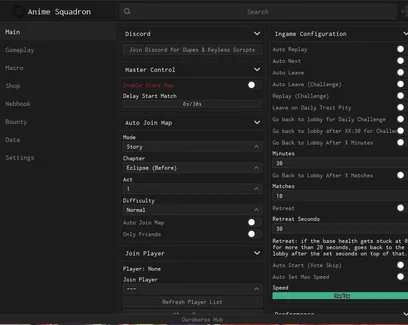
Select the map mode, chapter, act, and difficulty before enabling Auto Join Map. Daily and Challenge filters can target specific maps or rewards, while separate options cover Katakara Bridge, Ultimate Evil, and Raid content.
You can run privately with Only Friends, join a selected player, or use the refresh option when the target list changes.
Use Auto Play or record your own macro
Auto Play handles regular matches, including vote start, wave skipping, game speed, and Ultimate abilities. Auto Ultimate Near Boss can save the ability for the part of the run where extra damage matters most.
For stages that need a fixed placement route, use Record & Play Macro. Macro profiles store your actions, delays, and map bindings, so the same setup can be replayed on the correct stage.
Custom upgrade settings give each team slot its own target level and maxed-unit count. This is useful when one carry should receive most of the Yen while support units only need a few upgrades.
Control what happens after each run
Choose Replay, Next, or Leave based on your goal. Challenge modes have separate replay and leave settings, while Auto Restart can reset a run at a selected wave when you are farming an early reward or testing a setup.
Trait-related limits can stop Daily farming after pity is reached or skip the run when the relevant trait is already maxed. Trait resources are valuable, so these stop conditions help avoid continuing a farm after its target has been completed.
Manage summons, perks, and rewards
The hub can summon from a selected banner, purchase a chosen perk, and buy selected items from the Merchant or Raid Shop. Auto Quest, Auto Discovery, level milestone claims, and code redemption collect rewards that would otherwise sit in separate menus.
Webhook notifications can watch for selected dropped items and ping your user ID when something important appears, which is useful during longer macro or Challenge sessions.
 Discord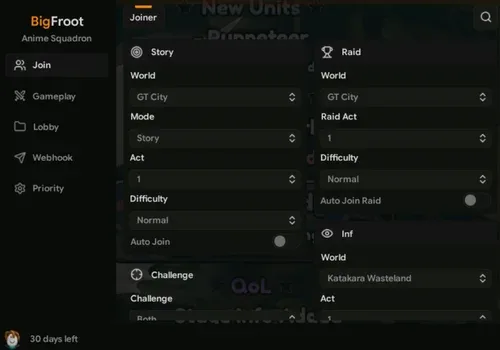




Comments
Loading comments…