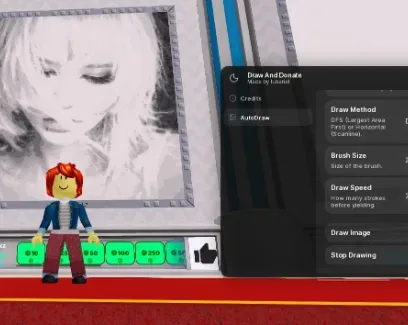
This script turns an image URL into a canvas-ready drawing through one connected processing pipeline. Auto draw with image URL loads the source, Auto Draw matches Canva's resolution fits the output to the in-game drawing space, and Quantizion Amount Colours using KMEANS++ reduces the image to a selected palette before rendering. Smarter Decoder Image - Load Image Faster handles the decoding stage, preparing the image before the chosen drawing method begins.
Image Preparation
Quantizion Amount Colours using KMEANS++ controls how many representative colors remain in the processed image. A lower amount groups similar shades into fewer color clusters, while a higher amount preserves more color variation. This changes palette complexity rather than increasing the original image resolution.
Resolution matching and color quantization solve separate problems: one adapts the image dimensions to the canvas, while the other controls how its colors are represented.
Draw Method Comparison
Draw Method (DFS / Horizontal / Pixel by Pixel) changes how the prepared image is traversed during rendering.
Method | Drawing order |
|---|
DFS
| Follows connected neighboring pixels before moving to another region |
Horizontal
| Processes the image row by row |
Pixel by Pixel
| Handles individual pixels in direct sequence |
These methods change the rendering order, not the source image itself. They provide separate traversal options after URL decoding, resolution matching, and palette quantization are complete.
 Draw & Donate 🎨NO KEY
 Discord
Comments · …
Loading comments…