Driving Empire mixes open-world driving, car collecting, races, and Security vs Outlaw jobs. Axonic Hub is one of the few scripts still working with this long-running game, and it runs without a key. It can equip owned cars, repeat solo races, investigate incidents and arrest Outlaws, or rob ATMs and cash out automatically. Speed, boost, and brake settings help with race grinding and police chases.
What is Auto Solo Race useful for?
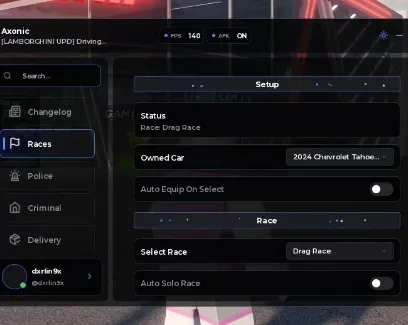
Choose one of your owned cars, equip it automatically, select a race, and repeat solo runs. This removes the need to restart each race manually when farming Cash for new cars or upgrades.
How do the Security tools work?
Auto Investigate handles investigation objectives, while Auto Arrest Players targets active Outlaws. This is useful for earning job rewards without manually searching the map for every criminal.
What can the Outlaw tools automate?
Auto Rob ATMs moves through the robbery process automatically. The Cashout Target setting controls when the script should return the stolen money, which normally must be secured before an Outlaw is arrested.
What do the vehicle settings change?
Top Speed increases the selected car’s speed limit
Infinite Boost keeps nitrous available
Brake Strength changes regular braking power
Hard Brake helps stop quickly during sharp turns or chases
Reset Top Speed restores the original vehicle setting
How do I use the Driving Empire script?
Open Driving Empire in Roblox.
Launch a compatible Roblox executor.
Load the script developed by Axonic Hub.
Execute it and select your owned car.
Enable the race, Security, Outlaw, or vehicle options you need.
The script has no key system, so no external verification steps are required.


 Discord

Comments
Loading comments…