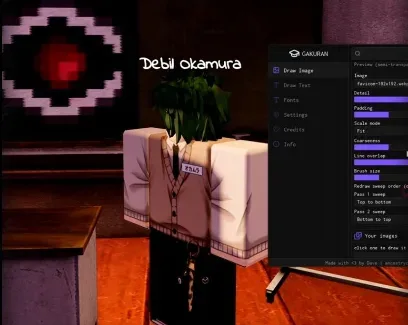
GAKURAN turns images and text into strokes that can be drawn directly on supported in-game boards. Select a drawing region then preview the result and adjust detail brush size overlap or redraw passes. Images can be loaded from local files or a direct URL. Server replication can make the finished drawing visible to other players when the game supports it.
How do I use GAKURAN?
Run GAKURAN with a compatible Roblox executor.
Move close to the board you want to use.
Select Draw Image or Draw Text.
Use Select Draw Region to choose where the drawing should appear.
Load your image or enter your text.
Check the preview and adjust the drawing settings.
Start drawing.
You can pause or stop a drawing at any time. For images with missing strokes you can increase Redraw Passes or adjust the sending settings.
How do I load a local image?
Place the image inside the Gakuran folder located in your executor's workspace folder. GAKURAN reads local images from this location regardless of the device you are using.
After adding the file open the image section in GAKURAN and select it from the available local images.
Can I load an image from a URL?
Yes. GAKURAN supports loading an image through a direct image URL. Paste the image link into the appropriate image field and use the preview to check how it will look before drawing.
Can I use a Roblox image ID?
Roblox image IDs are supported but they may not work correctly in every case. A local image from the Gakuran workspace folder or a direct image URL is usually the better option when an ID fails to load.
How can other players see the drawing?
Enable Replicate to Server before drawing. This sends the strokes through the game's drawing system instead of keeping them only on your client. Depending on the game you may also need to be holding chalk for server-side drawing to work.
How can I improve drawing quality?
Increase Detail for a more accurate image and use Redraw Passes when some strokes are missing. You can also change brush size line overlap coarseness padding and the redraw sweep direction to balance quality and drawing speed.
 (学乱) GakuranNO KEY
 Discord
 Showcase
Comments
Loading comments…