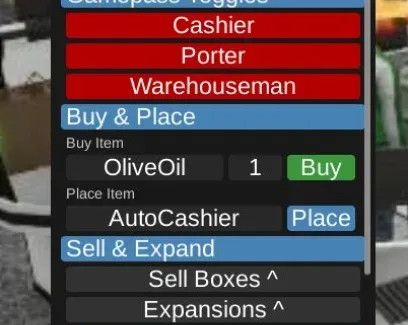
Run the store through three connected workflows rather than a collection of isolated controls. Staff-role toggles cover the cashier, porter, and warehouseman gamepasses. Stock tools handle item placement and replenishment, while the remaining utilities cover boxes, cash, and owner-level moderation.
Store Workflow
Area | Available Controls |
|---|
Staff roles | Toggle the cashier, porter, and warehouseman gamepasses. |
Items and stock | Buy and place items, then enable Auto-Restock when the store needs replenishment. |
Boxes and utilities | Sell furniture or product boxes, use Give Cash or Get Olive Oiled, and access Owner Only Auto Kicker. |
Buy and Place Items and Auto-Restock cover different stages of the same stock cycle: placement first, replenishment afterward. The two box-selling controls also remain separate—one for furniture boxes and one for product boxes.
Auto Kicker is marked Owner Only. The available function list does not indicate access for other users.
 Supermarket TogetherNO KEY




Comments
Loading comments…