For creatorsPublish your script
Reach players with keyless, universal, or place-specific scripts.
Browse
Script Types
Tools
Community
Reach players with keyless, universal, or place-specific scripts.
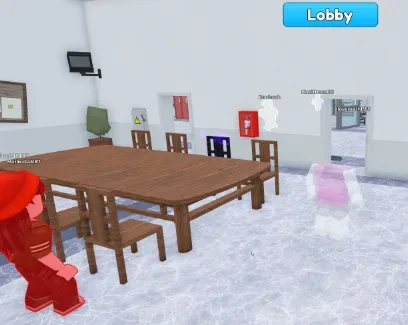
This open-source Suspect script adds two focused visual tools: Killer ESP and Player ESP.
Suspect is a social-deduction Roblox game inspired by the idea of a hidden killer being mixed in with the other players. That makes information important: normal players must watch movement and behaviour while the killer tries to avoid being identified.
The script does not attack, vote, complete tasks, or move your character. It only highlights characters so they are easier to locate.
Killer ESP marks the player identified by the script as the killer.
This is useful because the killer is normally supposed to stay hidden. Instead of guessing which player may be dangerous, you can see the marked character and watch where they move.
Killer ESP can help you:
avoid walking into the same room as the killer;
keep more distance when the killer approaches;
notice when the killer follows an isolated player;
remember which character should be watched during a meeting;
choose a safer route through the map.
The highlight does not stop the killer from reaching you. You still need to move away and avoid becoming trapped.
Player ESP highlights the remaining players around the map.
It can make characters easier to locate through walls, dark areas, and other map objects. This is useful when players separate or when you need to understand who was close to a suspicious event.
For example, Player ESP may help you see:
who is moving alone;
which players are grouped together;
who is approaching your position;
whether another player is following the killer;
where the remaining players went after a meeting.
Player ESP shows positions, not intentions. A highlighted player is not automatically innocent or suspicious.
Killer ESP answers the most urgent question: where is the dangerous player?
Player ESP adds context. It lets you compare the killer’s position with the locations of everyone else.
Together, the two modes can help you notice situations such as:
the killer moving toward an isolated player;
several players gathering far away from the killer;
someone staying unusually close to the marked killer;
the killer approaching your room from behind a wall.
The information may make the round easier to understand, but it does not prove what happened during every encounter.
The code is open source, so users can inspect how the highlights are created and how the script decides which characters belong to each ESP group.
This is more transparent than running a completely hidden loader, but open source does not automatically guarantee safety. Check the exact code you execute, especially when it downloads another file from an external URL.
Open Suspect and wait until the round begins.
Copy the code from the script block.
Run the open-source script once using a compatible environment.
Wait for the current players and their roles to load.
Check whether the killer receives a separate highlight.
Use Player ESP to track the locations of the other characters.
Re-execute only after joining a new server if the ESP does not reconnect automatically.
Do not run several ESP scripts together. Multiple scripts may create overlapping highlights and make it difficult to tell which colour belongs to the killer.
Killer ESP depends on the script correctly detecting the killer’s role. It may fail if Suspect changes where role information is stored or delays role data until later in the round.
Player ESP may also stop updating when:
a player respawns;
someone joins after execution;
the round resets;
character models are replaced;
the game changes its role or team system.
ESP provides information that is not normally visible and can create an unfair advantage. Third-party scripts may violate Roblox rules and can result in account penalties.
1local P=game:GetService"Players"2local L=P.LocalPlayer3local N="Knife"4local RC=Color3.fromRGB(255,0,0)5local WC=Color3.fromRGB(255,255,255)6local T=0.57local H={}8local B={}910local function U(p)11if p==L then return end12local c=p.Character13if not c or not c:FindFirstChildOfClass"Humanoid"or c.Humanoid.Health<=0 then14if H[p]then H[p]:Destroy()H[p]=nil end15if B[p]then B[p]:Destroy()B[p]=nil end16return end17task.wait(0.1)18local k=p:FindFirstChild"Backpack"and p.Backpack:FindFirstChild(N)19if not k then k=c:FindFirstChildOfClass"Tool"end20local hasKnife=k and k.Name==N21if H[p]then H[p]:Destroy()H[p]=nil end22local h=Instance.new"Highlight"23h.FillColor=hasKnife and RC or WC24h.FillTransparency=T25h.OutlineColor=hasKnife and RC or WC26h.DepthMode=Enum.HighlightDepthMode.AlwaysOnTop27h.Adornee=c28h.Parent=c29H[p]=h30if B[p]then B[p]:Destroy()B[p]=nil end31local b=Instance.new"BillboardGui"32b.Name="NameDisplay"33b.Size=UDim2.new(0,100,0,30)34b.StudsOffset=Vector3.new(0,3,0)35b.AlwaysOnTop=true36local t=Instance.new"TextLabel"37t.Size=UDim2.new(1,0,1,0)38t.BackgroundTransparency=139t.TextColor3=Color3.new(1,1,1)40t.TextStrokeColor3=Color3.new(0,0,0)41t.TextStrokeTransparency=0.342t.Font=Enum.Font.GothamBold43t.TextSize=1644t.Text=p.DisplayName45t.Parent=b46b.Parent=c47B[p]=b48end4950local function onCharacterAdded(character)51local p=P:GetPlayerFromCharacter(character)52if p then task.wait(0.5)U(p)end53end5455for _,v in pairs(P:GetPlayers())do56U(v)57if v.Character then58v.Character:WaitForChild"Humanoid".Died:Connect(function()task.wait(0.5)U(v)end)59end60v.CharacterAdded:Connect(onCharacterAdded)61end6263P.PlayerAdded:Connect(function(p)64U(p)65p.CharacterAdded:Connect(onCharacterAdded)66end)6768P.PlayerRemoving:Connect(function(p)69if H[p]then H[p]:Destroy()H[p]=nil end70if B[p]then B[p]:Destroy()B[p]=nil end71end)7273while task.wait(0.5)do74for _,v in pairs(P:GetPlayers())do75if v.Character and v.Character:FindFirstChildOfClass"Humanoid"and v.Character.Humanoid.Health>0 then76U(v)77end78end79end 🚨SuspectBy TheReal_TEG
Comments · …
Loading comments…