Browse
Script Types
Tools
Community
Reach players with keyless, universal, or place-specific scripts.
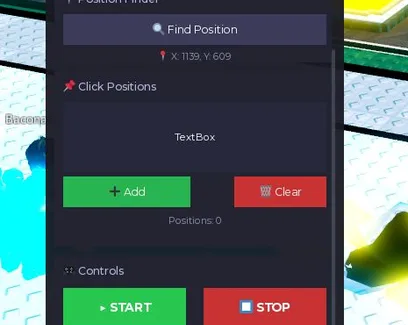
This +1 Katana Evolution Auto Clicker was created by the BobloScript.com team. The game gives +1 Katana Power for every click, which is then used to train, unlock stronger katanas, fight enemies and bosses, and reach better Ninja Evolutions. Auto Clicker handles that repeated clicking automatically, so you can build Katana Power without constantly tapping the screen.
Auto Clicker repeatedly performs the game's normal power-gaining click for you.
Since each click gives Katana Power, the function is useful when you need more power before unlocking stronger katanas or progressing toward tougher enemies and bosses.
It does not include Auto Win, Auto Rebirth, Auto Hatch, or automatic boss farming.
Yes. This script was created by the BobloScript.com team rather than collected from another hub developer.
It is also open source, so the code can be inspected before execution, and no key is required.
Open +1 Katana Evolution and wait for your character to load.
Copy the Auto Clicker code from the script block.
Open a compatible Roblox executor.
Paste the code and press Execute.
Enable Auto Clicker if the script provides a toggle.
Let it generate Katana Power while you continue progressing through the game.
Game updates can change the clicking system, so the Auto Clicker may need an update if it stops increasing Katana Power.
1--[[2 Auto-Clicker Script for Roblox3 - Multi-language support (EN/RU)4 - Movable GUI window5 - Adjustable click speed6 - Position finder tool7 - Multi-position clicking sequence8 - Hotkeys support9 - Visual feedback10--]]1112local UserInputService = game:GetService("UserInputService")13local RunService = game:GetService("RunService")14local Players = game:GetService("Players")15local TweenService = game:GetService("TweenService")16local player = Players.LocalPlayer17local mouse = player:GetMouse()1819-- Language settings20local currentLanguage = "EN" -- "EN" or "RU"2122local translations = {23 EN = {24 title = "🎯 Auto Clicker Pro",25 speed = "⚡ Click Speed",26 speedMin = "Min",27 speedMax = "Max",28 finder = "📍 Position Finder",29 findButton = "🔍 Find Position",30 findHint = "🔄 Click anywhere...",31 findTimeout = "⏱ Timeout",32 findSuccess = "✅ Position found: ",33 positions = "📌 Click Positions",34 positionsPlaceholder = "Enter coordinates with spaces\nExample: 100 200 300 400",35 addButton = "➕ Add",36 clearButton = "🗑️ Clear",37 positionsCount = "Positions: ",38 controls = "🎮 Controls",39 startButton = "▶ START",40 stopButton = "⏹ STOP",41 running = "▶ RUNNING",42 statusStopped = "⏸ Stopped (F1 - start)",43 statusRunning = "🔄 Clicker active (F1 - stop)",44 statusFinding = "🔍 Waiting for click to find position...",45 statusPositionFound = "✅ Position found: ",46 statusAdded = "✅ Added ",47 statusCleared = "🗑️ Positions cleared",48 statusTimeout = "⏱ Timeout",49 hotkeys = "Hotkeys: F1 - Start, F2 - Stop",50 loaded = "Auto Clicker Pro loaded!",51 langToggle = "🌐 EN",52 },53 RU = {54 title = "🎯 Auto Clicker Pro",55 speed = "⚡ Скорость кликов",56 speedMin = "Мин.",57 speedMax = "Макс.",58 finder = "📍 Поиск позиции",59 findButton = "🔍 Найти позицию",60 findHint = "🔄 Нажмите в любом месте...",61 findTimeout = "⏱ Время вышло",62 findSuccess = "✅ Позиция найдена: ",63 positions = "📌 Позиции для кликов",64 positionsPlaceholder = "Введите координаты через пробел\nПример: 100 200 300 400",65 addButton = "➕ Добавить",66 clearButton = "🗑️ Очистить",67 positionsCount = "Позиций: ",68 controls = "🎮 Управление",69 startButton = "▶ СТАРТ",70 stopButton = "⏹ СТОП",71 running = "▶ РАБОТАЕТ",72 statusStopped = "⏸ Остановлен (F1 - старт)",73 statusRunning = "🔄 Кликер активен (F1 - стоп)",74 statusFinding = "🔍 Ожидание клика для определения позиции...",75 statusPositionFound = "✅ Позиция найдена: ",76 statusAdded = "✅ Добавлено ",77 statusCleared = "🗑️ Позиции очищены",78 statusTimeout = "⏱ Время вышло",79 hotkeys = "Горячие клавиши: F1 - Старт, F2 - Стоп",80 loaded = "Auto Clicker Pro загружен!",81 langToggle = "🌐 RU",82 }83}8485-- Get translation function86local function t(key)87 return translations[currentLanguage][key] or key88end8990-- Settings91local Clicking = false92local ClickSpeed = {Min = 0.1, Max = 0.3}93local ClickPositions = {}94local CurrentPositionIndex = 195local isFindingPosition = false9697-- Create GUI98local ScreenGui = Instance.new("ScreenGui")99ScreenGui.Name = "AutoClickerGUI"100ScreenGui.IgnoreGuiInset = true101ScreenGui.ResetOnSpawn = false102ScreenGui.Parent = game.CoreGui103104-- Main window105local MainFrame = Instance.new("Frame")106MainFrame.Name = "MainFrame"107MainFrame.Size = UDim2.new(0, 340, 0, 500)108MainFrame.Position = UDim2.new(0.5, -170, 0.5, -250)109MainFrame.BackgroundColor3 = Color3.fromRGB(25, 25, 35)110MainFrame.BorderSizePixel = 0111MainFrame.ClipsDescendants = true112MainFrame.Active = true113MainFrame.Draggable = true114MainFrame.Parent = ScreenGui115116-- Title bar117local TitleBar = Instance.new("Frame")118TitleBar.Name = "TitleBar"119TitleBar.Size = UDim2.new(1, 0, 0, 40)120TitleBar.BackgroundColor3 = Color3.fromRGB(45, 45, 65)121TitleBar.BorderSizePixel = 0122TitleBar.Parent = MainFrame123124local TitleText = Instance.new("TextLabel")125TitleText.Size = UDim2.new(0.7, 0, 1, 0)126TitleText.Position = UDim2.new(0, 15, 0, 0)127TitleText.BackgroundTransparency = 1128TitleText.Text = t("title")129TitleText.TextColor3 = Color3.fromRGB(255, 255, 255)130TitleText.TextSize = 16131TitleText.Font = Enum.Font.GothamSemibold132TitleText.TextXAlignment = Enum.TextXAlignment.Left133TitleText.Parent = TitleBar134135-- Language toggle button136local LangButton = Instance.new("TextButton")137LangButton.Name = "LangButton"138LangButton.Size = UDim2.new(0, 50, 0, 28)139LangButton.Position = UDim2.new(0.7, 0, 0, 6)140LangButton.BackgroundColor3 = Color3.fromRGB(60, 60, 90)141LangButton.BorderSizePixel = 0142LangButton.TextColor3 = Color3.fromRGB(255, 255, 255)143LangButton.TextSize = 12144LangButton.Font = Enum.Font.GothamBold145LangButton.Text = "🌐 EN"146LangButton.Parent = TitleBar147148LangButton.MouseButton1Click:Connect(function()149 if currentLanguage == "EN" then150 currentLanguage = "RU"151 LangButton.Text = "🌐 EN"152 else153 currentLanguage = "EN"154 LangButton.Text = "🌐 RU"155 end156 updateAllTexts()157end)158159-- Close button160local CloseButton = Instance.new("TextButton")161CloseButton.Name = "CloseButton"162CloseButton.Size = UDim2.new(0, 30, 0, 30)163CloseButton.Position = UDim2.new(1, -35, 0, 5)164CloseButton.BackgroundColor3 = Color3.fromRGB(200, 50, 50)165CloseButton.BorderSizePixel = 0166CloseButton.Text = "✕"167CloseButton.TextColor3 = Color3.fromRGB(255, 255, 255)168CloseButton.TextSize = 16169CloseButton.Font = Enum.Font.GothamBold170CloseButton.Parent = TitleBar171172CloseButton.MouseButton1Click:Connect(function()173 MainFrame:Destroy()174end)175176-- Scroll container177local ScrollingFrame = Instance.new("ScrollingFrame")178ScrollingFrame.Size = UDim2.new(1, -20, 1, -55)179ScrollingFrame.Position = UDim2.new(0, 10, 0, 50)180ScrollingFrame.BackgroundTransparency = 1181ScrollingFrame.CanvasSize = UDim2.new(0, 0, 0, 540)182ScrollingFrame.ScrollBarThickness = 4183ScrollingFrame.ScrollBarImageColor3 = Color3.fromRGB(100, 100, 120)184ScrollingFrame.Parent = MainFrame185186-- UI Elements storage for updating187local UI_Elements = {}188189local function createSection(titleKey, yPos, height)190 local section = Instance.new("Frame")191 section.Size = UDim2.new(1, 0, 0, height)192 section.Position = UDim2.new(0, 0, 0, yPos)193 section.BackgroundColor3 = Color3.fromRGB(35, 35, 50)194 section.BorderSizePixel = 0195 section.Parent = ScrollingFrame196 197 local label = Instance.new("TextLabel")198 label.Size = UDim2.new(1, -20, 0, 25)199 label.Position = UDim2.new(0, 10, 0, 5)200 label.BackgroundTransparency = 1201 label.Text = t(titleKey)202 label.TextColor3 = Color3.fromRGB(180, 180, 220)203 label.TextSize = 14204 label.Font = Enum.Font.GothamSemibold205 label.TextXAlignment = Enum.TextXAlignment.Left206 label.Parent = section207 label.Name = "SectionLabel"208 209 return section, label210end211212-- Speed section213local speedSection, speedLabel = createSection("speed", 0, 90)214local speedContent = Instance.new("Frame")215speedContent.Size = UDim2.new(1, -20, 0, 50)216speedContent.Position = UDim2.new(0, 10, 0, 35)217speedContent.BackgroundTransparency = 1218speedContent.Parent = speedSection219220local MinSpeedBox = Instance.new("TextBox")221MinSpeedBox.Size = UDim2.new(0, 135, 0, 35)222MinSpeedBox.Position = UDim2.new(0, 0, 0, 0)223MinSpeedBox.BackgroundColor3 = Color3.fromRGB(50, 50, 70)224MinSpeedBox.BorderSizePixel = 0225MinSpeedBox.TextColor3 = Color3.fromRGB(255, 255, 255)226MinSpeedBox.TextSize = 14227MinSpeedBox.Font = Enum.Font.Gotham228MinSpeedBox.PlaceholderText = t("speedMin")229MinSpeedBox.Text = "0.1"230MinSpeedBox.Parent = speedContent231UI_Elements.MinSpeedBox = MinSpeedBox232233local MaxSpeedBox = Instance.new("TextBox")234MaxSpeedBox.Size = UDim2.new(0, 135, 0, 35)235MaxSpeedBox.Position = UDim2.new(1, -135, 0, 0)236MaxSpeedBox.BackgroundColor3 = Color3.fromRGB(50, 50, 70)237MaxSpeedBox.BorderSizePixel = 0238MaxSpeedBox.TextColor3 = Color3.fromRGB(255, 255, 255)239MaxSpeedBox.TextSize = 14240MaxSpeedBox.Font = Enum.Font.Gotham241MaxSpeedBox.PlaceholderText = t("speedMax")242MaxSpeedBox.Text = "0.3"243MaxSpeedBox.Parent = speedContent244UI_Elements.MaxSpeedBox = MaxSpeedBox245246-- Finder section247local finderSection, finderLabel = createSection("finder", 100, 90)248local finderContent = Instance.new("Frame")249finderContent.Size = UDim2.new(1, -20, 0, 50)250finderContent.Position = UDim2.new(0, 10, 0, 35)251finderContent.BackgroundTransparency = 1252finderContent.Parent = finderSection253254local FindButton = Instance.new("TextButton")255FindButton.Size = UDim2.new(1, 0, 0, 35)256FindButton.BackgroundColor3 = Color3.fromRGB(60, 60, 90)257FindButton.BorderSizePixel = 0258FindButton.TextColor3 = Color3.fromRGB(255, 255, 255)259FindButton.TextSize = 14260FindButton.Font = Enum.Font.Gotham261FindButton.Text = t("findButton")262FindButton.Parent = finderContent263UI_Elements.FindButton = FindButton264265local PositionDisplay = Instance.new("TextLabel")266PositionDisplay.Size = UDim2.new(1, 0, 0, 20)267PositionDisplay.Position = UDim2.new(0, 0, 0, 38)268PositionDisplay.BackgroundTransparency = 1269PositionDisplay.Text = "X: 0, Y: 0"270PositionDisplay.TextColor3 = Color3.fromRGB(150, 150, 180)271PositionDisplay.TextSize = 12272PositionDisplay.Font = Enum.Font.Gotham273PositionDisplay.Parent = finderContent274275-- Positions section276local posSection, posLabel = createSection("positions", 200, 200)277local posContent = Instance.new("Frame")278posContent.Size = UDim2.new(1, -20, 0, 160)279posContent.Position = UDim2.new(0, 10, 0, 35)280posContent.BackgroundTransparency = 1281posContent.Parent = posSection282283local PosInputBox = Instance.new("TextBox")284PosInputBox.Size = UDim2.new(1, 0, 0, 80)285PosInputBox.BackgroundColor3 = Color3.fromRGB(40, 40, 60)286PosInputBox.BorderSizePixel = 0287PosInputBox.TextColor3 = Color3.fromRGB(255, 255, 255)288PosInputBox.TextSize = 13289PosInputBox.Font = Enum.Font.Gotham290PosInputBox.MultiLine = true291PosInputBox.TextWrapped = true292PosInputBox.PlaceholderText = t("positionsPlaceholder")293PosInputBox.Parent = posContent294UI_Elements.PosInputBox = PosInputBox295296local PosButtons = Instance.new("Frame")297PosButtons.Size = UDim2.new(1, 0, 0, 35)298PosButtons.Position = UDim2.new(0, 0, 0, 85)299PosButtons.BackgroundTransparency = 1300PosButtons.Parent = posContent301302local AddPosButton = Instance.new("TextButton")303AddPosButton.Size = UDim2.new(0, 145, 0, 35)304AddPosButton.BackgroundColor3 = Color3.fromRGB(40, 180, 80)305AddPosButton.BorderSizePixel = 0306AddPosButton.TextColor3 = Color3.fromRGB(255, 255, 255)307AddPosButton.TextSize = 14308AddPosButton.Font = Enum.Font.Gotham309AddPosButton.Text = t("addButton")310AddPosButton.Parent = PosButtons311UI_Elements.AddPosButton = AddPosButton312313local ClearPosButton = Instance.new("TextButton")314ClearPosButton.Size = UDim2.new(0, 105, 0, 35)315ClearPosButton.Position = UDim2.new(1, -105, 0, 0)316ClearPosButton.BackgroundColor3 = Color3.fromRGB(200, 50, 50)317ClearPosButton.BorderSizePixel = 0318ClearPosButton.TextColor3 = Color3.fromRGB(255, 255, 255)319ClearPosButton.TextSize = 14320ClearPosButton.Font = Enum.Font.Gotham321ClearPosButton.Text = t("clearButton")322ClearPosButton.Parent = PosButtons323UI_Elements.ClearPosButton = ClearPosButton324325local PosCountLabel = Instance.new("TextLabel")326PosCountLabel.Size = UDim2.new(1, 0, 0, 20)327PosCountLabel.Position = UDim2.new(0, 0, 0, 125)328PosCountLabel.BackgroundTransparency = 1329PosCountLabel.Text = t("positionsCount") .. "0"330PosCountLabel.TextColor3 = Color3.fromRGB(150, 150, 180)331PosCountLabel.TextSize = 12332PosCountLabel.Font = Enum.Font.Gotham333PosCountLabel.Parent = posContent334UI_Elements.PosCountLabel = PosCountLabel335336-- Controls section337local controlSection, controlLabel = createSection("controls", 410, 100)338local controlContent = Instance.new("Frame")339controlContent.Size = UDim2.new(1, -20, 0, 50)340controlContent.Position = UDim2.new(0, 10, 0, 35)341controlContent.BackgroundTransparency = 1342controlContent.Parent = controlSection343344local StartButton = Instance.new("TextButton")345StartButton.Size = UDim2.new(0, 140, 0, 45)346StartButton.Position = UDim2.new(0, 0, 0, 2.5)347StartButton.BackgroundColor3 = Color3.fromRGB(40, 200, 80)348StartButton.BorderSizePixel = 0349StartButton.TextColor3 = Color3.fromRGB(255, 255, 255)350StartButton.TextSize = 16351StartButton.Font = Enum.Font.GothamBold352StartButton.Text = t("startButton")353StartButton.Parent = controlContent354UI_Elements.StartButton = StartButton355356local StopButton = Instance.new("TextButton")357StopButton.Size = UDim2.new(0, 140, 0, 45)358StopButton.Position = UDim2.new(1, -140, 0, 2.5)359StopButton.BackgroundColor3 = Color3.fromRGB(200, 50, 50)360StopButton.BorderSizePixel = 0361StopButton.TextColor3 = Color3.fromRGB(255, 255, 255)362StopButton.TextSize = 16363StopButton.Font = Enum.Font.GothamBold364StopButton.Text = t("stopButton")365StopButton.Parent = controlContent366UI_Elements.StopButton = StopButton367368-- Status bar369local StatusBar = Instance.new("TextLabel")370StatusBar.Size = UDim2.new(1, -20, 0, 20)371StatusBar.Position = UDim2.new(0, 10, 0, 520)372StatusBar.BackgroundTransparency = 1373StatusBar.Text = t("statusStopped")374StatusBar.TextColor3 = Color3.fromRGB(255, 200, 100)375StatusBar.TextSize = 12376StatusBar.Font = Enum.Font.Gotham377StatusBar.Parent = ScrollingFrame378UI_Elements.StatusBar = StatusBar379380-- Hotkeys hint381local HotkeysHint = Instance.new("TextLabel")382HotkeysHint.Size = UDim2.new(1, -20, 0, 15)383HotkeysHint.Position = UDim2.new(0, 10, 0, 540)384HotkeysHint.BackgroundTransparency = 1385HotkeysHint.Text = t("hotkeys")386HotkeysHint.TextColor3 = Color3.fromRGB(120, 120, 150)387HotkeysHint.TextSize = 10388HotkeysHint.Font = Enum.Font.Gotham389HotkeysHint.Parent = ScrollingFrame390UI_Elements.HotkeysHint = HotkeysHint391392-- Update all texts function393function updateAllTexts()394 TitleText.Text = t("title")395 speedLabel.Text = t("speed")396 MinSpeedBox.PlaceholderText = t("speedMin")397 MaxSpeedBox.PlaceholderText = t("speedMax")398 finderLabel.Text = t("finder")399 FindButton.Text = t("findButton")400 posLabel.Text = t("positions")401 PosInputBox.PlaceholderText = t("positionsPlaceholder")402 AddPosButton.Text = t("addButton")403 ClearPosButton.Text = t("clearButton")404 PosCountLabel.Text = t("positionsCount") .. #ClickPositions405 controlLabel.Text = t("controls")406 407 if Clicking then408 StartButton.Text = t("running")409 else410 StartButton.Text = t("startButton")411 end412 StopButton.Text = t("stopButton")413 414 if not Clicking then415 StatusBar.Text = t("statusStopped")416 end417 418 HotkeysHint.Text = t("hotkeys")419end420421-- Functions422local function updateStatus(textKey, color, ...)423 local text = t(textKey)424 if ... then425 text = text .. ...426 end427 StatusBar.Text = text428 StatusBar.TextColor3 = color or Color3.fromRGB(255, 200, 100)429end430431-- Find position432FindButton.MouseButton1Click:Connect(function()433 if isFindingPosition then return end434 isFindingPosition = true435 FindButton.Text = t("findHint")436 updateStatus("statusFinding", Color3.fromRGB(100, 200, 255))437 438 local connection439 connection = UserInputService.InputBegan:Connect(function(input, processed)440 if processed then return end441 if input.UserInputType == Enum.UserInputType.MouseButton1 then442 local x, y = mouse.X, mouse.Y443 PositionDisplay.Text = string.format("📍 X: %d, Y: %d", x, y)444 FindButton.Text = t("findButton")445 updateStatus("findSuccess", Color3.fromRGB(100, 255, 100), x .. ", " .. y)446 isFindingPosition = false447 connection:Disconnect()448 end449 end)450 451 wait(5)452 if isFindingPosition then453 FindButton.Text = t("findButton")454 updateStatus("statusTimeout", Color3.fromRGB(255, 100, 100))455 isFindingPosition = false456 end457end)458459-- Add positions460AddPosButton.MouseButton1Click:Connect(function()461 local text = PosInputBox.Text462 local numbers = {}463 for num in text:gmatch("%d+") do464 table.insert(numbers, tonumber(num))465 end466 467 local added = 0468 for i = 1, #numbers, 2 do469 if numbers[i+1] then470 table.insert(ClickPositions, {X = numbers[i], Y = numbers[i+1]})471 added = added + 1472 end473 end474 475 PosCountLabel.Text = t("positionsCount") .. #ClickPositions476 PosInputBox.Text = ""477 updateStatus("statusAdded", Color3.fromRGB(100, 255, 100), added)478end)479480-- Clear positions481ClearPosButton.MouseButton1Click:Connect(function()482 ClickPositions = {}483 PosCountLabel.Text = t("positionsCount") .. "0"484 updateStatus("statusCleared", Color3.fromRGB(255, 200, 100))485end)486487-- Click function488local function ClickAtPosition(x, y)489 local oldPos = Vector2.new(mouse.X, mouse.Y)490 mouse1click()491 mousemoveabs(x, y)492 mouse1click()493 mousemoveabs(oldPos.X, oldPos.Y)494end495496-- Hotkeys497UserInputService.InputBegan:Connect(function(input, processed)498 if processed then return end499 if input.KeyCode == Enum.KeyCode.F1 then500 StartButton.MouseButton1Click:Fire()501 elseif input.KeyCode == Enum.KeyCode.F2 then502 StopButton.MouseButton1Click:Fire()503 end504end)505506-- Start507StartButton.MouseButton1Click:Connect(function()508 if Clicking then return end509 510 Clicking = true511 ClickSpeed.Min = tonumber(MinSpeedBox.Text) or 0.1512 ClickSpeed.Max = tonumber(MaxSpeedBox.Text) or 0.3513 514 StartButton.BackgroundColor3 = Color3.fromRGB(40, 180, 40)515 StartButton.Text = t("running")516 updateStatus("statusRunning", Color3.fromRGB(100, 255, 100))517 518 spawn(function()519 while Clicking do520 if #ClickPositions > 0 then521 local pos = ClickPositions[CurrentPositionIndex]522 ClickAtPosition(pos.X, pos.Y)523 CurrentPositionIndex = CurrentPositionIndex % #ClickPositions + 1524 else525 mouse1click()526 end527 528 local delay = math.random() * (ClickSpeed.Max - ClickSpeed.Min) + ClickSpeed.Min529 wait(delay)530 end531 end)532end)533534-- Stop535StopButton.MouseButton1Click:Connect(function()536 Clicking = false537 StartButton.BackgroundColor3 = Color3.fromRGB(40, 200, 80)538 StartButton.Text = t("startButton")539 updateStatus("statusStopped", Color3.fromRGB(255, 200, 100))540end)541542-- Animation543local startPos = MainFrame.Position544MainFrame.Position = UDim2.new(0.5, -170, 0.5, -250)545MainFrame.BackgroundTransparency = 1546547spawn(function()548 for i = 0, 1, 0.05 do549 MainFrame.BackgroundTransparency = 1 - i550 wait(0.01)551 end552end)553554-- Print loaded message555print(t("loaded"))556print(t("hotkeys")) +1 Katana EvolutionBy Gatto vs Denis
 Telegram
Comments · …
Loading comments…