
For creatorsPublish your script
Reach players with keyless, universal, or place-specific scripts.
Browse
Script Types
Tools
Community
Reach players with keyless, universal, or place-specific scripts.
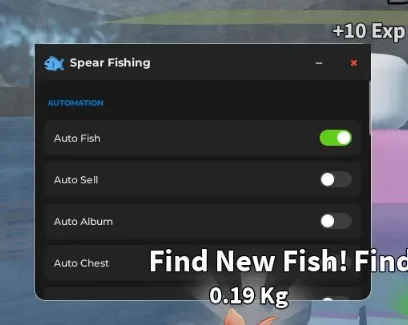
This Spear Fishing script automates the main parts of the fishing loop: hunting fish, selling catches, searching for missing album entries, and collecting chests.
Spear Fishing is built around hunting underwater creatures, improving your equipment, and unlocking stronger harpoons. Accurate hits and the fish you catch affect how quickly you can earn rewards and move forward.
The script is most useful when you no longer want to search each area and attack every fish manually.
Auto Fish searches for an available fish and performs the fishing or attacking process automatically.
This reduces the time spent swimming between targets and repeatedly using your harpoon. It can help when you want to:
collect more fish for selling;
farm an area for a longer session;
earn resources for equipment upgrades;
search through many catches for a missing species.
The function does not automatically unlock locations your account cannot access. Better areas and stronger targets may still require normal game progression and improved equipment.
A full inventory is only useful after the fish are sold.
Auto Sell handles that repeated step for you, allowing the farming cycle to continue without manually returning to sell after every group of catches.
It works together with Auto Fish as a simple loop:
Catch available fish.
Add them to the inventory.
Sell the collected fish.
Continue hunting.
This is useful when your goal is earning currency rather than keeping every duplicate catch.
Check which fish the function sells before leaving it active for a long time. The feature should not be assumed to protect rare, locked, or personally important fish unless that behaviour is visible in the script settings.
Auto Album is the most useful function for collection progress.
Instead of farming every nearby fish without a goal, it focuses on species that have not yet been registered in your album. This helps when most common entries are already complete and only specific catches remain.
Use Auto Album when you want to:
fill empty album slots;
spend less time catching duplicates;
find which available fish still count toward collection progress;
work toward album completion more directly.
The function can only target fish that are currently available to your account. It cannot guarantee an immediate rare catch, remove luck requirements, or access a locked sea automatically.
Auto Chest searches for available chests and collects them without requiring you to check each location manually.
This adds another reward source while the fishing functions are active. It is useful when chests appear away from your current target or are easy to miss during repeated fishing.
Auto Chest does not create new chests or bypass their normal availability. If no chest is active in the current area, the function may have nothing to collect.
Enable Auto Fish and Auto Sell when you mainly want currency and repeated catches.
Use Auto Album when collection progress matters more than selling large numbers of duplicate fish.
Add Auto Chest when you want the script to collect extra map rewards during the same session.
Avoid enabling every function immediately. Test Auto Fish first, then Auto Sell, and only after that enable Album or Chest automation. This makes it easier to identify which option stops working after an update.
Open Spear Fishing and wait for your character and the current sea to load.
Copy the code from the script block.
Open a compatible Roblox executor.
Paste the script into the executor and press Execute.
Enable Auto Fish and check whether it selects targets correctly.
Turn on Auto Sell if you want continuous currency farming.
Use Auto Album when you want the script to prioritize fish missing from your collection.
Enable Auto Chest to collect available chests during the session.
Run the script only once. Executing it several times may start duplicate fishing, selling, or target-selection loops.
Game updates can change fish names, target locations, album data, chests, or the way catches are registered. The script may still open while one individual function no longer works.
Possible signs of an outdated version include:
Auto Fish attacks no target;
the script repeatedly selects the same unavailable fish;
Auto Album continues catching completed entries;
Auto Sell does not detect the inventory;
Auto Chest moves toward an old location.
Using third-party scripts and executors may violate Roblox rules and can lead to account penalties. Never enter your Roblox password, cookies, or personal information into a script or executor.
This script loads code from an external source. Review the URL and understand what it does before running it in Roblox.
1loadstring(game:HttpGet('https://pastebin.com/raw/SRkLx5hN'))() Spear FishingBy Fishgig Game
Comments · …
Loading comments…